
A meeting confirmation workflow is the set of messages and rules that run from the moment a prospect books a call until the call is held, rescheduled or written off. The version that works is short: one instant confirmation, a small number of reminders, a clear way to move the meeting, and a CRM record that updates itself. Below is the full routine, with the places where it usually breaks. It also shows why founders who want booked meetings without building the machinery themselves hand the whole thing to a team that already runs it.
TL;DR
- Send the confirmation within minutes of booking, with date, time, both time zones, the join link and a reschedule link in the body.
- Cap pre-meeting touches at three: the confirmation, a reminder about 24 hours before, and a short nudge close to start time.
- Meetings booked far out are the ones that vanish, so the workflow should shorten the gap or add a mid-gap touch.
- Every booking event (booked, moved, cancelled, held, missed) should update the CRM automatically, or the follow-up never fires.
- If you would rather not build and babysit this, a human-backed outbound service can own it end to end. See the promo section below.
Table of Contents
- Why the confirmation is where meetings are won or lost
- Step 1: Trigger the confirmation the moment the meeting is booked
- Step 2: Write a confirmation that answers every logistics question
- Step 3: Set the reminder cadence
- Step 4: Check your data before the 24-hour reminder
- Step 5: Build the reschedule and no-show paths
- Step 6: Connect the workflow to your CRM
- Five mistakes that quietly raise no-shows
- What to measure
- Our perspective
- Let us run the workflow for you
- FAQ
- Sources
Why the confirmation is where meetings are won or lost
Booking a meeting is not the win. A held meeting is. Everything between those two moments is the confirmation workflow, and it is the cheapest part of outbound to fix.
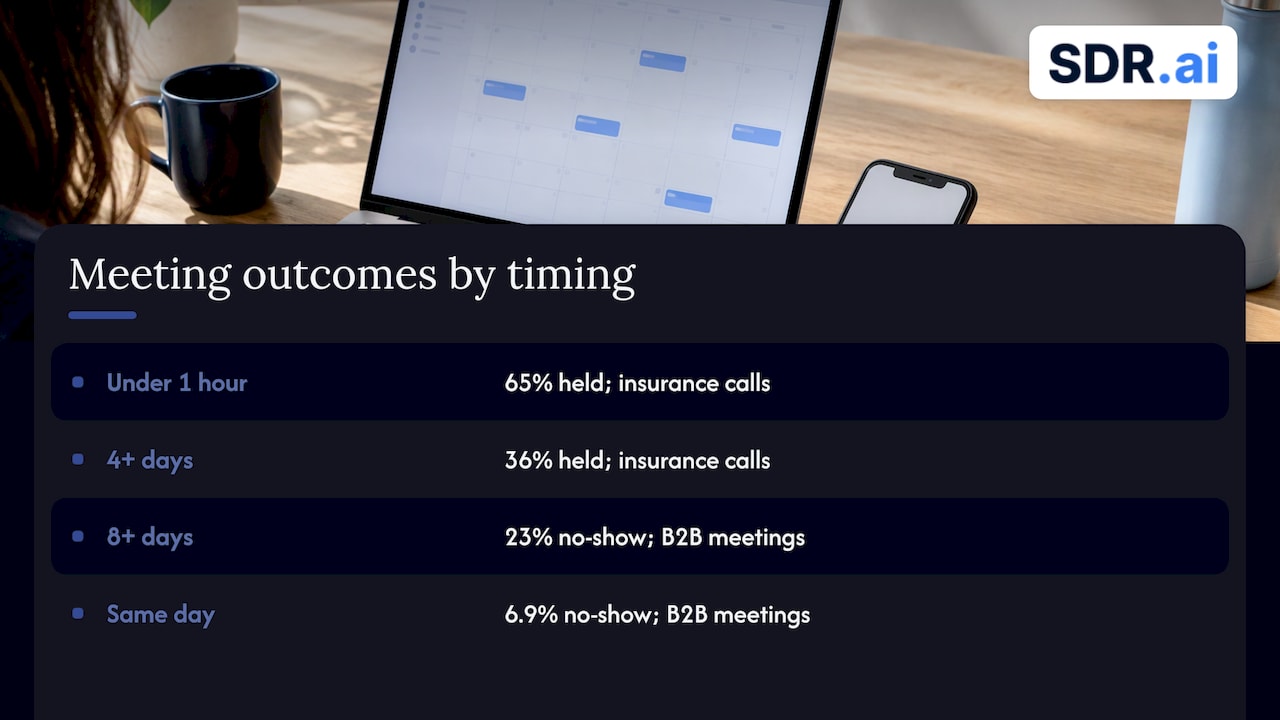
The gap matters more than most teams assume. One analysis of 2,262 booked sales calls at a US insurance agency found that calls booked under an hour ahead were held 65% of the time, while calls booked four or more days ahead were held only 36%. A separate summary of 6,428 B2B meetings, reported by Captiwate, cites a 23% no-show rate for meetings scheduled eight or more days out versus 6.9% for same-day meetings. Treat these as directional, since each comes from one dataset, but the pattern is consistent: the longer the wait, the more can change.
For a founder or a small sales team, each lost slot is expensive. You paid for the research, the outreach and the reply handling that produced it. A workflow that recovers even a few of those slots a month pays for itself faster than another round of prospecting.
Step 1: Trigger the confirmation the moment the meeting is booked
The first message should go out immediately, whether the prospect booked through a scheduling link or agreed to a time in a reply. Do not wait for a daily batch.
What it takes: a trigger that fires on every new booking. If your prospects book through a calendar link, the link tool can send the invite. If a rep or an SDR agrees a time in an email thread, someone has to create the invite and send the confirmation by hand, and this is where delays creep in. A confirmation that goes out hours later feels like an afterthought, and the prospect has already moved on mentally.
Where it goes wrong: meetings agreed in conversation never get a structured confirmation because no tool saw them. The fix is a rule that no meeting exists until an invite and a confirmation have gone out, and that the booking is logged in the CRM at the same time.
Step 2: Write a confirmation that answers every logistics question
A good confirmation is short and complete. Aim for under 120 words and include:
- Subject line with date and time: "Confirmed: Thursday, 2 PM ET, intro call with [Name]".
- Time zone written for both sides when you are crossing zones, for example "2 PM ET / 11 AM PT". A missing zone is a quiet cause of missed calls, and the prospect's calendar can display a different zone than yours even when both are correct.
- The join link on its own line, or the address if you meet in person.
- A calendar file or link, so the meeting lands in the prospect's calendar without effort.
- One line on the agenda, phrased around their problem, not your product.
- A named sender with a real reply address, not a no-reply mailbox.
- A reschedule link in the email body, not only inside the calendar invite, where many people never look.
These elements line up with the checklists published by several sales-tooling blogs, such as the attendance-ranked list in Tomba's appointment confirmation guide, though no one has a controlled test of the exact wording. Use it as a sensible default and adjust to your replies.
A template you can adapt
Subject: Confirmed: Thursday, 2 PM ET / 11 AM PT, call with Dana
Hi Priya, you're booked for 20 minutes on Thursday, March 12, at 2 PM ET / 11 AM PT.
Join here: [link]
We'll cover how your team handles inbound demo requests today and where outbound could add pipeline. If a different colleague should join, reply with their name.
Need a different time? Pick one here: [reschedule link]
Dana, direct line [number]
That is about 75 words. It restates who, when and why, and it gives the prospect two easy actions: join, or move it.
How to respond when you receive a meeting confirmation
If you are on the other side, the reply is simple: thank them, state that you can attend, repeat the date, time and zone, and add it to your calendar. To decline or move the meeting, say so quickly, ideally within a day, and offer two or three alternative times in the same message. MailMaestro's guide to replying to invitations lays out the same three parts: thanks, your decision and next steps.
Step 3: Set the reminder cadence
Reminders work, and the research behind them is older than sales tech. A Cochrane review of randomized trials found that text message reminders improved attendance at healthcare appointments. The setting is clinics, not B2B calls, but the mechanism is the same: people forget, and a timely nudge fixes it.
A practical B2B sequence:
| Touch | When | Purpose |
|---|---|---|
| Confirmation | Within minutes of booking | Logistics, calendar file, reschedule link |
| Value touch | 2 to 3 days before, only if booked 5+ days out | A short case study or relevant link, no pitch |
| Main reminder | About 24 hours before | Restate time, zones, join link |
| Final nudge | 1 hour before or morning of | Join link only |
| Missed-call check | 5 to 10 minutes after start | "Are you joining?" with the link |
Cap the pre-meeting touches at three. Five emails ahead of a 20-minute call reads as pressure, not service. Stop the sequence the moment the prospect confirms, declines or reschedules, so nobody gets a reminder for a meeting they already moved.
Handle meetings booked far out
Long gaps are the biggest risk, so treat them differently. Cognism's SDR teams, as reported in Mystery Demo's 2026 roundup, reported lifting one manager's show rate from about 60% to 72% by capping booking horizons at four days, sharing a case study two days before and sending a short confirmation the day before. You can copy the logic without the exact numbers: offer slots in the next few business days, and add a value touch when you cannot.
Pick the channel deliberately
Email is the default, but a short text before the call often gets seen faster. In the US, texting a prospect has legal strings attached. Under the Telephone Consumer Protection Act, senders generally need prior express written consent before sending automated marketing texts to a mobile number. The clean approach is to collect the mobile number and an explicit opt-in at the booking step, and to have your counsel confirm the wording before you automate any texts. Without that opt-in, stay with email and a calendar notification.
Step 4: Check your data before the 24-hour reminder
Meetings that came out of cold outreach, or that sit weeks away, carry hidden risks. Three quick checks before the main reminder save a surprising number of calls:
- Is the email address still valid? If the invite bounced, every reminder bounces too.
- Is the person still in the role? For meetings a month or more out, people change jobs.
- Do you have a direct phone number? A rep can make a short call at the five-minute mark instead of sending yet another email.
The third check is where a dialer earns its keep. A rep who can place a quick call from the same system that holds the booking turns a probable no-show into a short conversation and a new time.
Step 5: Build the reschedule and no-show paths
A workflow that only handles the happy path leaves money on the table. Plan three branches.
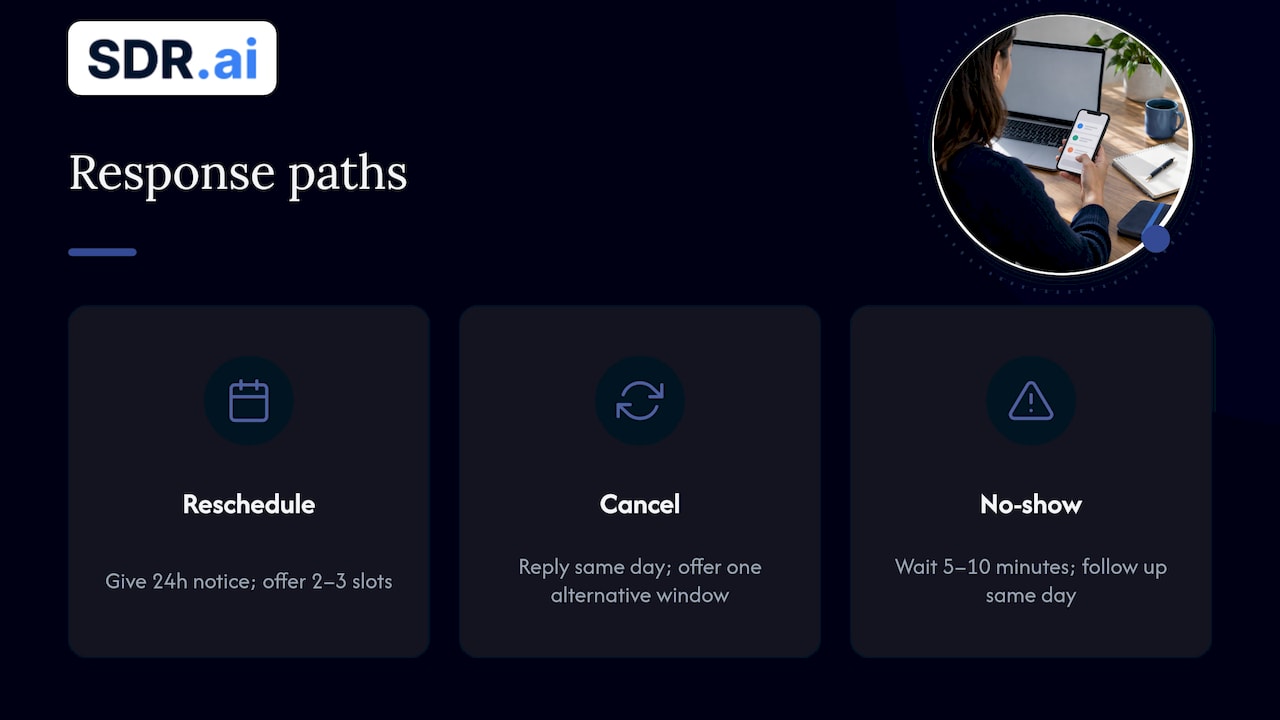
The prospect asks to reschedule. Make it frictionless. Give at least 24 hours' notice when you are the one moving, offer two or three new slots in the same message, cancel the old invite and send a new one, and confirm the agenda still applies. If moving a meeting requires writing an awkward email, many people simply won't show.
The prospect cancels. Reply the same day with a single alternative window. Do not argue or pitch. Tag the record in the CRM with the reason, since patterns in cancellations tell you whether the problem is timing, targeting or the original offer.
The prospect doesn't appear. Wait five to ten minutes, send the "are you joining?" message, and if there is no reply, send a no-show follow-up the same day with a link to pick a new time. A second, softer attempt two or three days later is reasonable. After that, return the contact to your normal nurture cadence. Our guide to follow-up cadence covers how many touches to run after the first attempt.
Step 6: Connect the workflow to your CRM
The messages are the visible half. The invisible half is the data: every booking event should write to the CRM without anyone typing it in.
A workable setup treats five events as triggers:
- Booked: create or update the contact, log the meeting on the timeline, move the deal to a "Meeting Booked" stage, send the confirmation.
- Rescheduled: update the date, cancel the old reminders, schedule new ones.
- Cancelled: flag the deal, start the re-book message.
- Held: move the stage forward and prompt the rep to log the outcome.
- Not held: mark the no-show and start the recovery sequence.
Most scheduling tools and CRMs can pass these events along through built-in integrations or webhooks, which are automatic messages one system sends another when something happens. If you are mapping this out for the first time, a step-by-step marketing automation checklist is a useful way to sequence the connections. Our explainer on sales engagement versus CRM shows which system should own which part of the record.
The common failure is a stale outcome field. If reps forget to mark meetings as completed or missed, reporting says you have booked far more than you held, and the no-show sequence never starts. Automate the status change from the calendar event, and use a simple rule: no outcome logged within 24 hours triggers a reminder to the rep.
Five mistakes that quietly raise no-shows
- Too many touches. More than three reminders before a short call feels like pressure.
- No reschedule option. Hard-to-move meetings become no-shows.
- A pitch inside the reminder. A reminder confirms logistics. Save the pitch for the call.
- A missing or one-sided time zone. "2 PM" means nothing to someone three zones away.
- Booking too far out. Offer the nearest sensible slot, then fill the wait with a useful touch.
What to measure
Track three numbers by month: the held rate (meetings held divided by meetings booked), the reschedule rate, and the share of no-shows you recover into a new meeting. Segment the held rate by days-out at booking, because that cut tells you quickly whether your problem is the messages or the calendar. If you want more on this, our post on improving your meeting show rate goes deeper on tactics, and how to increase qualified meetings covers what happens upstream.
Our perspective
A confirmation workflow is only as good as the meeting it protects. We see the order of operations this way: first the right person, then the right moment, then the logistics.
That is why our outbound starts from your ideal customer profile and intent signals, and why a human SDR handles every reply. When a prospect says yes to a call, a person who knows the conversation is on the other end of the thread, so the confirmation, the agenda line and the reschedule offer come from someone who understands why the prospect agreed.
For a founder or a small team, the real cost of a confirmation workflow is not the tooling. It is the attention: watching bounces, nudging reps to log outcomes, chasing no-shows. That attention is exactly what a startup does not have to spare, and it is what we take on so you can spend your time in the meetings themselves.
The result we aim for is simple pipeline math: replies become booked meetings, booked meetings become held meetings, and you can see each step.
Chad
Let us run the workflow for you
If you want booked meetings without hiring and managing an SDR team, our AI-Powered Outbound service is built for that: LinkedIn-first outreach to your ideal customer profile, intent-based targeting, and a human SDR who handles every reply. It costs $2,500 per month plus a one-off $500 setup fee. You can see how it would run against your market on the demo page, or review the service on the SDR.ai site.
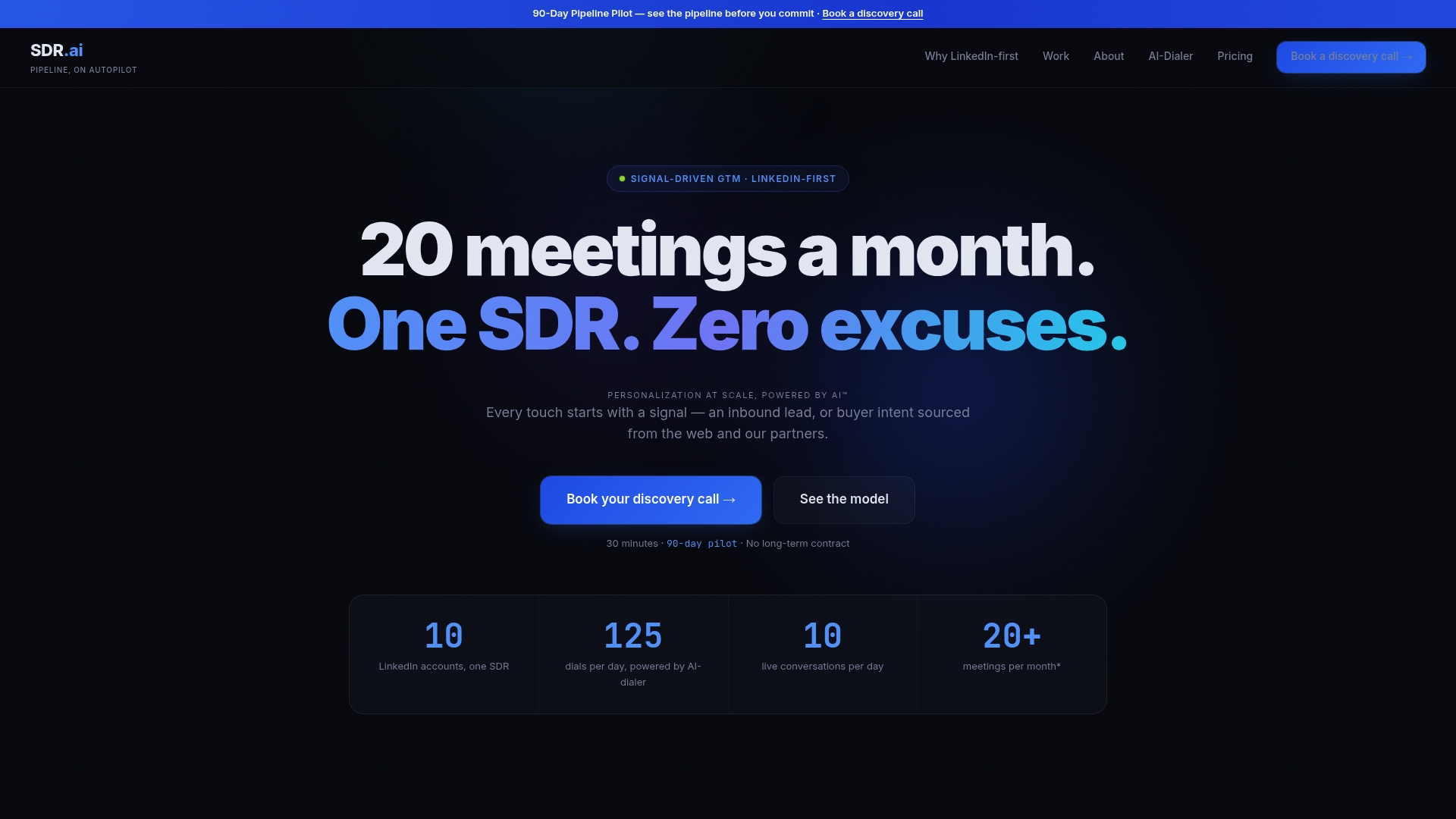
If your team already books its own meetings and needs faster follow-up by phone, our AI-Dialer is available at $2,400 per year with a one-off $500 onboarding fee.
FAQ
How soon should I send a meeting confirmation?
Send it within minutes of booking, ideally automatically. An immediate message confirms the details while the prospect is still thinking about the call. Reminders then follow about 24 hours before and, if you like, a short note an hour before.
Should the reminder include an agenda?
Yes, one line is enough. Tie it to the prospect's situation rather than your product. A short agenda gives the person a reason to show up, and keeps the reminder from reading like an automated notice.
How many reminders are too many?
More than three before the meeting is too many for a short B2B call. A confirmation, a 24-hour reminder and one last nudge cover most cases. Stop the sequence as soon as the prospect confirms, declines or reschedules.
What should happen when a prospect no-shows?
Send an "are you joining?" message five to ten minutes after the start time, then a same-day note with a link to pick a new slot. A second attempt two or three days later is reasonable, after which the contact returns to your normal follow-up cadence.
Sources
- Appointment No-Show Statistics: 65% vs 36% Held
- Sample Meeting Reminder Email: 7 Templates for 2026
- Email Appointment Confirmation: Do 9 Templates Work?
- Reply to meeting invitation email: 4 samples
- Mobile phone messaging reminders for attendance at healthcare appointments (Cochrane)
- 27 SaaS Demo No-Show Statistics (2026)
- The FCC's "Prior Express Written Consent" Rule Is Changing