
A sales tech stack audit answers one question: which of the tools your team pays for actually help it book meetings and close deals? You list every tool, measure who really uses it, trace how a lead moves between systems, and then keep, fix, merge or cut each one. Most startups finish with the same discovery: the stack is not short of software, it is short of people with time to work the pipeline. That is why we built our outbound service around a human SDR and a small, signal-driven toolset, and why the last step of this guide asks whether the gap you found needs another subscription at all.
TL;DR
- Build the inventory from three lists (finance, admin console, and the reps themselves), because no single list is complete.
- Judge each tool on active seats, a clear funnel job, and whether its data reaches your CRM.
- Most stack problems sit between tools: broken handoffs, manual copy-paste, and no named owner.
- Decide per tool: keep, fix, merge or cut, and mind the cancellation notice window, not just the renewal date.
- If the audit exposes a follow-up or outreach gap, check whether it is a capacity problem before you buy another tool.
Table of Contents
- What a sales tech stack audit covers
- Why it pays off
- Step 1: Build the inventory from three lists
- Step 2: Measure real usage, not opinions
- Step 3: Tie every tool to a funnel job
- Step 4: Trace a lead end to end
- Step 5: Name the type of gap
- Step 6: Decide: keep, fix, merge or cut
- Step 7: Roll out changes without stalling prospecting
- When the audit points to a capacity gap
- Promo: outbound with the tools already chosen for you
- Perspective
- FAQ
- Sources
What a sales tech stack audit covers
A sales tech stack is every piece of software your sellers touch to find prospects, talk to them, track deals and report on results. An audit is more than a spreadsheet of subscriptions. It looks at performance, usage and ROI of each tool, plus the processes, integrations and ownership around them, so you can see redundancy, underused seats and gaps in the handoff from first inquiry to signed deal.
For a startup or a lean sales team, a practical audit covers these areas:
- Core systems: your CRM and any other system of record.
- Apps: email, scheduling, calling, sequences, data enrichment, proposals, e-signature, chat, payments, reporting and AI tools.
- Integrations: what data moves between them, in which direction, how often.
- Processes: the path from lead to closed deal to customer handoff.
- People: who owns each tool, who has access, who actually uses it.
- Shadow tools: spreadsheets, free plans and subscriptions bought on personal cards.
That last item matters more than founders expect. A mid-size revenue stack routinely turns out to contain 30 to 60 distinct tools once finance, admin and rep interviews are reconciled.
Why it pays off
Tool sprawl is common and expensive. A 2025 benchmark of 938 B2B companies found the typical sales stack holds 8.3 tools costing about $187 per rep per month, with 73% of teams running overlapping tools and 49% of licenses going unused. The same study reports reps spend only about 28 to 30% of their week selling, with roughly 17% going to CRM data entry.
Treat those as benchmarks from one study, not your numbers. Your own billing data will tell you more. But they explain why an audit is usually the cheapest growth project a founder can run: it frees budget and, more importantly, rep hours.
Step 1: Build the inventory from three lists
Start with three parallel passes, because each one catches what the others miss:
- The finance list. Every SaaS line item and every card charge for the past 12 months, including small recurring ones.
- The admin list. Every app your single sign-on provider or Google Workspace/Microsoft admin console grants access to.
- The human list. Ask each rep to narrate a normal Tuesday and name every screen they open.
For each tool, record 10 to 12 fields. The most useful ones: owner, cost, seats purchased versus seats active in the last 30 days, renewal date, cancellation notice window, dependencies and who approved it. If a tool has no usage data at all, write that down. It is a finding in itself, because nobody can say whether it earns its place.
Where it goes wrong: founders audit only what finance sees. Tools bought by a rep on a personal card, or by a department head on a team plan, never appear. The human list is the one that finds them. If you also want a reference for tracking which of your own metrics show the stack is working, this piece on SaaS growth analytics is a useful companion for the measurement side.
Step 2: Measure real usage, not opinions
Pull 90 days of usage data where you can. Then apply a category-specific definition of "active" so you are not comparing a daily dialer to a quarterly contract tool:
| Tool type | Counts as active if |
|---|---|
| Daily tools (CRM, dialer, sequences) | Logged in most working days in the last 30 |
| Weekly tools (reporting, enablement) | Used in 3 of the last 4 weeks |
| Occasional tools (e-signature, proposals) | Used in the last 90 days |
These definitions come from The Revenue Thesis's SaaS audit guide, which also flags any seat-priced tool where fewer than about 80% of purchased seats meet the definition.
Idle license cost is simple arithmetic: (licensed seats × cost per seat) minus (active users × cost per seat). A tool licensed to 50 users with 15 daily active users runs at 30% utilization. At $100 per seat per month, that is 35 idle seats, or $3,500 a month spent on nothing.
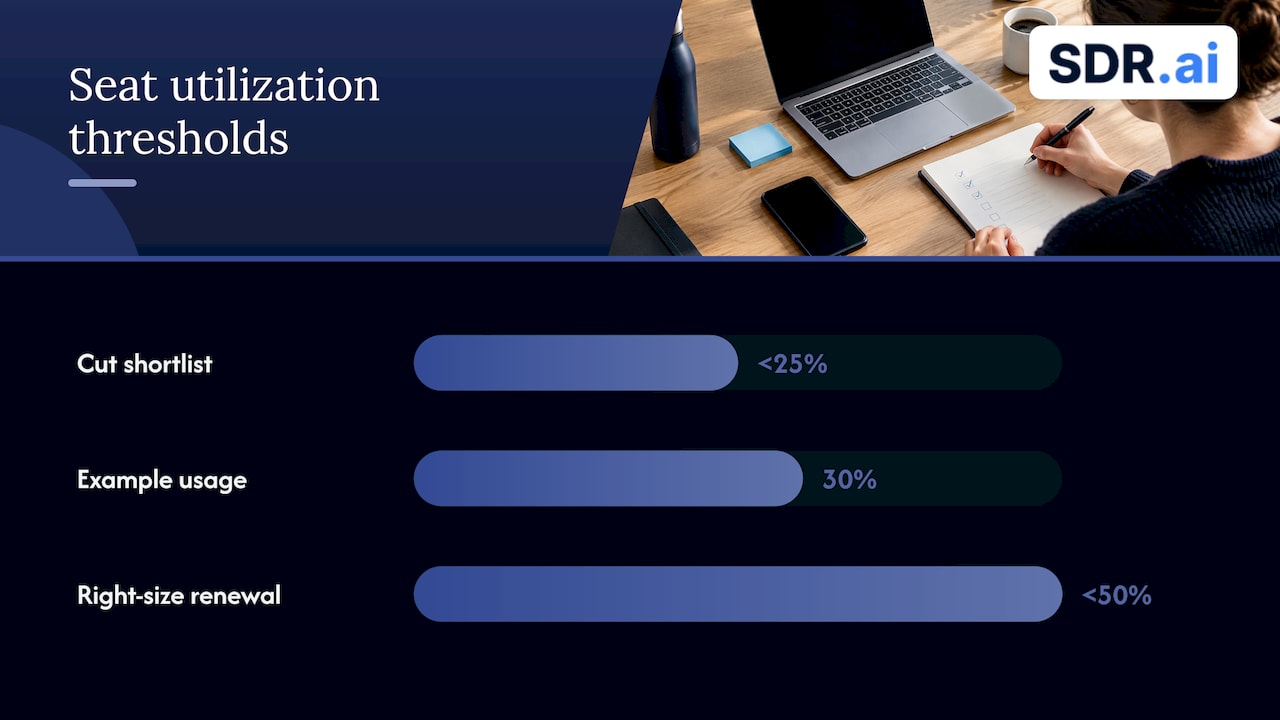
Two rules of thumb from MarTechBar: under 50% of seats active means right-size the contract at renewal, and under 25% puts the tool on the shortlist to fix or cut. A tool with active users but no output is a training problem, not a tool problem.
Step 3: Tie every tool to a funnel job
For each tool, write one sentence naming the outcome it supports: pipeline creation, deal progression, forecast accuracy, or coaching. A tool you cannot tie to one of those outcomes is overhead.
Then compare cost per outcome rather than cost per seat. Add the annual license, the share of people's time spent running the tool, and any agency or integration fees. MarTechBar argues that a tool whose data never reaches the CRM cannot show any outcome, which makes that alone a reason to fix or cut it.
Here is a worked example. Tool A costs $50 per seat per month but forces five hours of manual re-entry per rep per week. Tool B costs $150 per seat. Erakraft's illustration is that the cheaper license is the more expensive tool once the workaround time is counted. If a rep costs you $40 an hour loaded, five hours a week is about $800 a month per rep. The $100 license difference is noise next to it.
Step 4: Trace a lead end to end
Most audit value hides between tools. Take one lead and follow it through your stack: form or outreach reply, enrichment, routing, SDR, account executive, deal stages, closed-won, customer handoff. At each handoff, ask three questions:
- Does the data move automatically?
- Do the fields survive intact?
- Is there exactly one system of record?
Then document every integration: what data moves, in which direction, how often and by what method (native connector, an automation platform such as Zapier or Make, custom API, or manual export). Red flags, per the same integration health checklist: one-way syncs that should be two-way, daily batch jobs serving real-time needs, critical data that never reaches another system, and "integrations" that are really copy-paste between browser tabs.
A simple three-point scoring scheme works well. Native integration with live data is a keep. A partial or one-way sync is a review. Anything that requires manual export is a retire-or-replace candidate.
To go beyond documentation, run a real test: submit a test form, watch routing, move a deal through each stage and check reporting at every step. Simulation finds failures that documents miss, such as workflows that fire in a sandbox but break on live records. If your CRM setup and automation need rework after this step, a guide to CRM and automation setup shows what that work typically involves.
Two handoffs deserve extra scrutiny in a small team. The first is reply handling: replies from outbound campaigns that never land in the CRM are lost pipeline. Our guide on outbound CRM integration patterns covers four ways to prevent that. The second is the SDR-to-AE transfer, covered in our lead handoff process guide.
Step 5: Name the type of gap
Before you decide anything, label each problem. Stack gaps fall into four types: coverage (no tool for a step), integration (tools that do not talk), data quality (the same field means different things in different systems) and ownership (nobody is accountable).
Each type has a different remedy:
| Gap type | What fixes it |
|---|---|
| Coverage | New software |
| Integration | Middleware or a native connector |
| Data quality | A field dictionary and governance |
| Ownership | A clear owner and a decision on who does what |
Buying a tool only fixes the first. Skip this step and you end up buying a coverage solution for what was really an ownership problem.
Step 6: Decide: keep, fix, merge or cut
Use a decision table so the call is made on criteria, not on who likes which tool. This version follows MarTechBar's framework:
| Decision | When |
|---|---|
| Keep | Clear funnel job, more than half the seats active, data reaching the CRM, cost per outcome in line with alternatives |
| Fix | Right job, low use. Train users, connect the data, set a 90-day usage target, then cut if missed |
| Merge | Another tool wins on four tests: keeps data in the CRM without manual work, has the most active users, has a named owner, costs less per active user |
| Cut | No clear job, under a quarter of seats active, or no visible outcome |
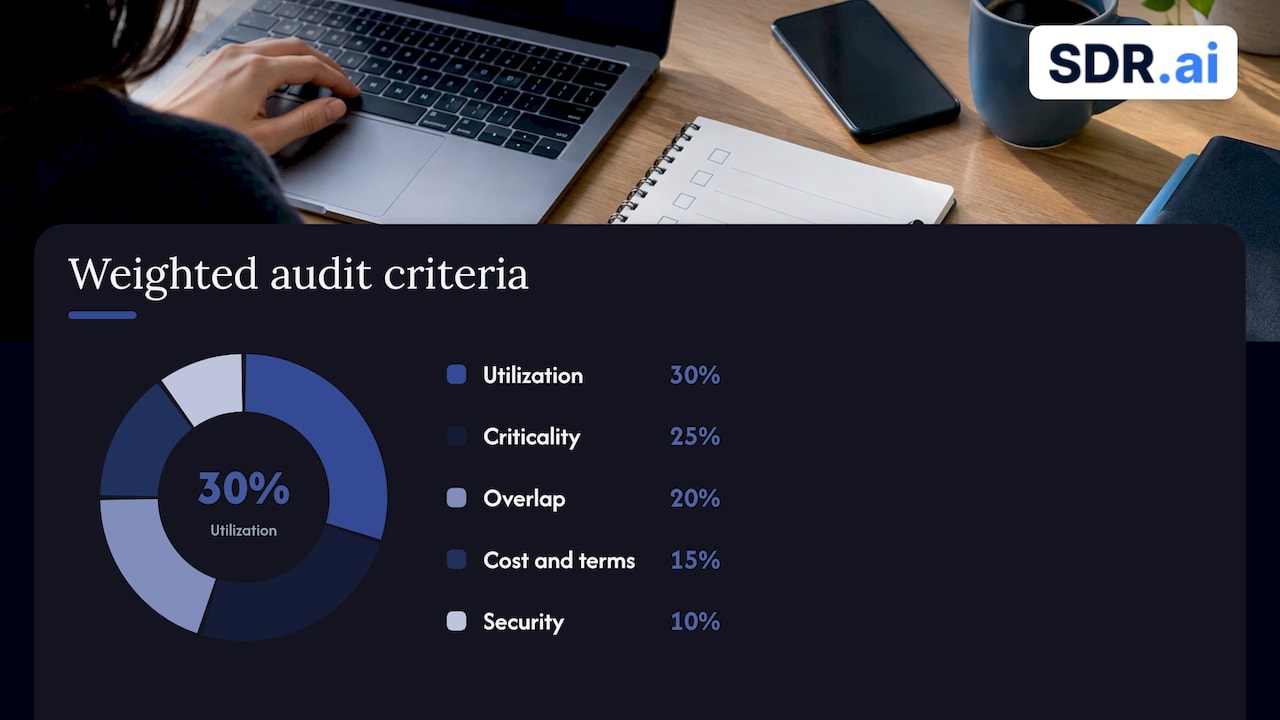
If you prefer weighted scoring, The Revenue Thesis suggests utilization 30%, business criticality 25%, overlap 20%, cost trend and terms 15%, security 10%. A score of 2.4 or above keeps the tool and right-sizes seats, 1.7 to 2.4 means consolidate or renegotiate, and below 1.7 means cut at the next notice window. A low-scoring tool a customer contract requires stays until the contract changes.
Do not skip the "investigate" cases. A critical tool with low usage may simply lack training, have a broken integration or have lost its owner after a reorganization. Cutting it too fast removes capability you still need. And watch the calendar: the cancellation notice period, often 30 to 90 days, matters more than the renewal date, so a tool you decide to cut in its renewal month has often already renewed.
What consolidation can look like
One published case: a SaaS company with more than 300 employees had 187 Salesforce licenses but only 112 regular users and six overlapping point solutions. After a 14-week audit and consolidation it cut CRM licensing costs 42% and saved $180,000 a year. Results like that come from a larger organization than most startups, but the pattern is the same at any size: seats nobody uses and tools that do the same job.
Step 7: Roll out changes without stalling prospecting
Sequence the changes by risk. Start with cuts that have no data dependencies. Save migrations that touch historical CRM data or active sales sequences for last, and run old and new in parallel before you decommission anything customer-facing, as NoGood recommends.
Score findings by revenue impact against effort and put them on a 90-day plan: quick wins in days 1 to 30, foundation fixes in days 31 to 60, larger items in days 61 to 90, as in this framework.
Then lock in governance, or the sprawl returns: a named stack owner, a quarterly review, and a purchasing gate where every new tool request must map to a specific gap the audit identified.
When the audit points to a capacity gap
Here is a pattern worth checking for. The audit shows you own a CRM, a sequencing tool, a data tool and a dialer, usage is low, and replies still go stale. The tools are not the cause. Nobody has the time to run them, and a coverage fix (yet another tool) will not change that.
For a founder-led team, the question becomes how outreach gets done by someone, consistently, without a long SDR hiring and ramp-up cycle. Our approach to the AI sales stack explains the layers that matter, and our comparison of sales engagement and CRM shows why you need both and where each stops. If your audit leaves you running a Salesforce-class stack for a handful of reps, simplifying toward fewer tools and a person who works them is usually the lean answer.
Promo: outbound with the tools already chosen for you
SDR.ai's AI-Powered Outbound is a LinkedIn-first service for B2B companies: targeted, personalized outreach to your ideal customer profile, intent-based lead identification, warm calling with an AI dialer, and follow-up across channels. A human SDR handles every reply. It costs $2,500 per month plus a one-time $500 setup fee, so it replaces the cost of an in-house SDR and the stack that goes with it. You can see how it would run against your own ICP on the demo page, or review the AI-Powered Outbound service.
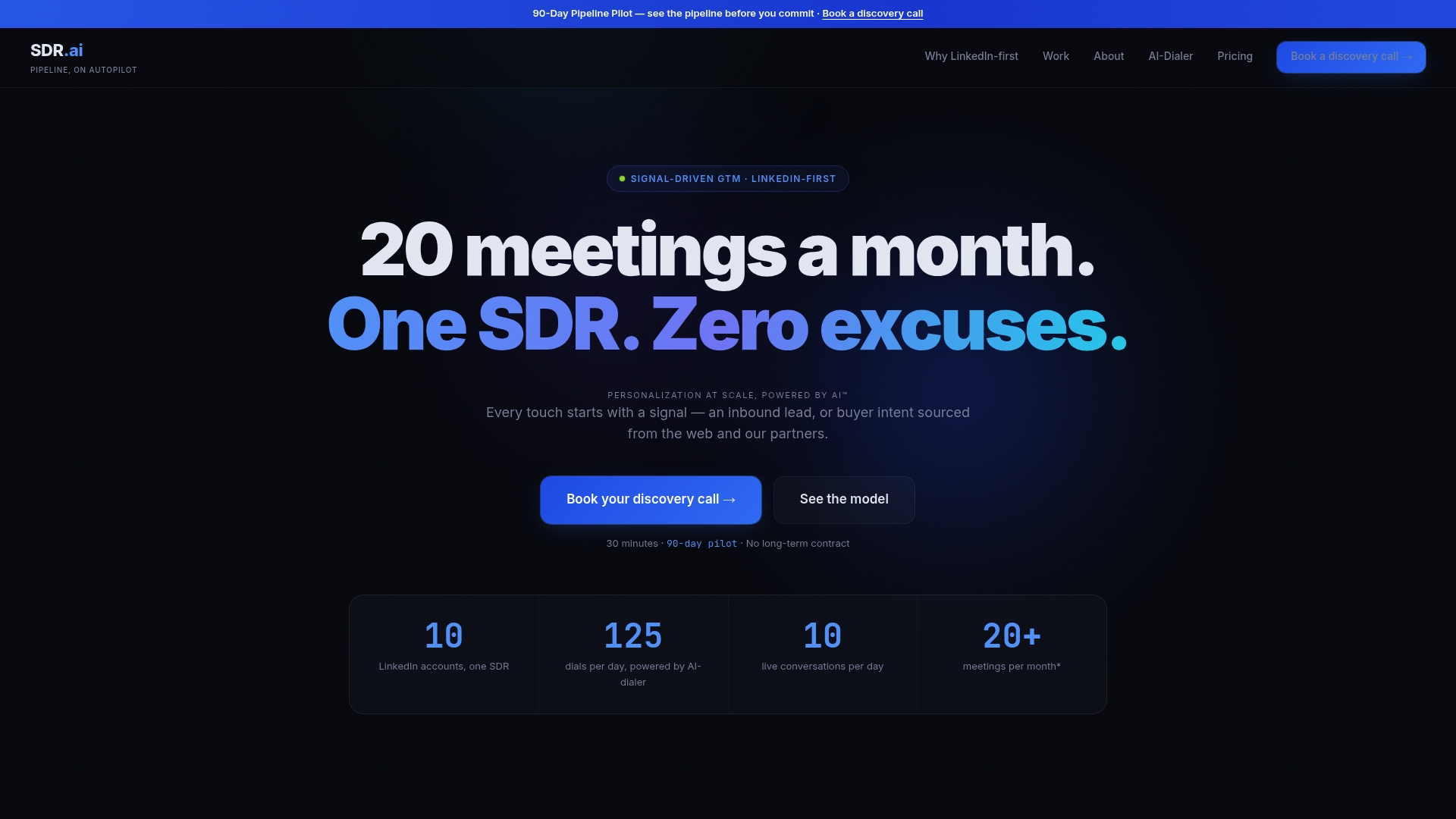
If you already have an SDR team and want to fix the calling layer of your stack, our AI-Dialer is $2,400 per year with a $500 one-time onboarding fee. Details are on the AI-Dialer page.
Perspective
When we look at a startup's stack, the pattern is rarely a missing tool. It is a missing owner. Tools pile up because every function optimizes for its own needs, and nobody is responsible for the thing that matters: whether a prospect who shows intent gets a relevant message and a fast reply.
That is why we built our service around signals and the ideal customer profile, not around volume. We focus outreach on LinkedIn, where buyers are already visible, and on the intent signals that tell us who is worth contacting. A human SDR handles every reply, so a response does not die in an inbox or a sequence nobody checks.
Our view is that an audit should end in pipeline math, not a tidier spreadsheet. Count the qualified meetings your current stack produces per month, divide the total cost of tools and people by that number, and compare. Our model is designed to book over 20 qualified meetings a month with minimal manpower, and it is the number we want you to hold us to.
The simplest stack is one where each tool has a job and a person has the time to do it. That is what we aim to give you.
Chad
FAQ
How often should we run a sales tech stack audit?
Run a full audit once a year and a lighter review each quarter. Time it ahead of your largest renewals, because cancellation notice windows of 30 to 90 days can pass before you act. A named stack owner should keep the inventory current between audits.
How long does an audit take for a small team?
For a startup with a handful of reps and a few dozen tools, the inventory and usage review can often be done in a couple of weeks of part-time effort. Interviews with reps and the end-to-end lead trace take the most time. Rollout of the changes is separate and follows the 90-day plan above.
What is the difference between a tech stack audit and a sales audit?
A sales tech stack audit looks at tools, integrations, data and ownership. A broader sales audit also examines messaging, process, pipeline and performance. The tech audit is the faster, more concrete place to start, since usage and billing data give you hard numbers.
Should we cut a tool with low usage?
Not automatically. A tool at 40% active usage deserves investigation, as SalesOS Labs notes, because the cause may be missing training, a broken integration or a lost owner. Fix it with a 90-day usage target and cut it if the target is missed.
Sources
- How to Run a Sales Tech Stack Audit
- How to audit your existing tech stack for gaps
- How to Audit Your Sales Tech Stack
- Sales tech stack: where your SaaS budget leaks
- SaaS stack audit: the complete guide
- The True Cost of Your Sales Tech Stack
- How to audit a martech stack and decide what to cut
- GTM Tech Stack Rationalization: Practical Guide
- How to Audit Your Sales Tech Stack (Without Losing Your Mind)
- Tech Stack Audit: 5-Step Framework
- GTM Stack Audit: Consolidate Into One System
- How a Tech Company Cut Costs by Consolidating CRM Licenses
- Analytics for Content Marketing: Boosting SaaS Growth
- Go High Level CRM & Automation