
Outbound CRM integration writes sequence, email, and dialer activity directly into your CRM, so routing, attribution, and reporting run on real data instead of what reps remember to log. Skip it, and you're managing a pipeline built on guesswork. Get it right, and every call, reply, and open becomes a trigger your team can automate around.
TL;DR:
- Reliable CRM outbound integration ensures all call, email, and activity data is structured and real-time, preventing guesswork and enabling automated, behavior-based actions.
- Native two-way syncs are preferred for accuracy and ease but often require higher subscriptions, while middleware and API connectors offer flexibility at the cost of added complexity.
- Proper identity matching, including normalized email and phone data, is critical to avoid duplicates and ensure accurate tracking of touchpoints and dispositions.
- Integration failures often stem from BCC-only logging and inconsistent call outcome taxonomy, which reduce reporting quality and compliance safety.
- Phased implementation, from stakeholder alignment to continuous monitoring, helps ensure a stable, compliant, and actionable outbound CRM setup.
Table of Contents
- What Is CRM Integration for Outbound, and Why Doesn't BCC Cut It?
- Why Outbound Activity Has to Reach the CRM
- How Outbound Integrations Actually Work Under the Hood
- What Data Should a Full Outbound Integration Sync?
- What Should You Look for When Evaluating an Outbound Integration?
- How Do Dialing Modes Affect What Gets Logged in Your CRM?
- What's a Realistic Rollout Timeline for a CRM Integration Project?
- What Compliance Rules Apply to Outbound Calling and Email Data?
- What Are the Most Common Mistakes Teams Make With Outbound Integrations?
- How SDR.ai Handles Outbound-to-CRM Activity in Practice
- What Should You Fix First in Your Outbound Stack?
- Ready to Move Past DIY Integration Work?
- Where to Go for Implementation and Compliance Details
- Sources
- FAQ
What Is CRM Integration for Outbound, and Why Doesn't BCC Cut It?
Most teams start outbound tracking with the easiest possible method: BCC the CRM on every email and hope for the best. It works, technically, until it doesn't. BCC logging captures a raw message copy but strips out the structured event data your CRM needs to actually do anything useful with it, like tying a reply to a specific sequence step or triggering a task when a prospect opens an email three times in one day.
Crm integration for outbound, done properly, means structured writeback: every send, reply, open, call, and disposition lands in the CRM as a discrete, queryable event tied to a contact and a campaign. That's the difference between "we sent some emails" and "Contact X opened Email 3 twice, then replied, then got a call attempt logged forty minutes later."
The failure modes of manual and BCC-based logging show up fast at scale:
- Reps forget to BCC, or the CRM address gets typoed, and entire threads vanish from the record.
- Replies land in a personal inbox, not the CRM, so a hot lead sits unassigned for days.
- No open or click data reaches the CRM at all, killing any chance of behavior-based routing.
- Call outcomes get logged as free-text notes instead of structured dispositions, making reporting nearly impossible.
There are three real integration paths: native vendor apps built by the CRM or the outreach tool, middleware/webhook layers that sit between systems, and direct API connectors your engineering team builds and maintains.
Why Outbound Activity Has to Reach the CRM
Attribution and routing only work when the CRM sees activity as it happens, not days later in a CSV export. A synced event, a sequence reply, a call disposition, a meeting booked, can trigger workflow rules instantly: assign the lead to the right rep, start an SLA clock, or flag a deal stage change.
Consider a typical B2B chain: a prospect gets added to an outbound sequence, opens two emails, books a call from a reply, and the call converts to a qualified meeting. With integration, that entire path is visible as one attribution chain from first touch to booked meeting. Without it, someone reconstructs it manually from four different tools, if they bother at all.
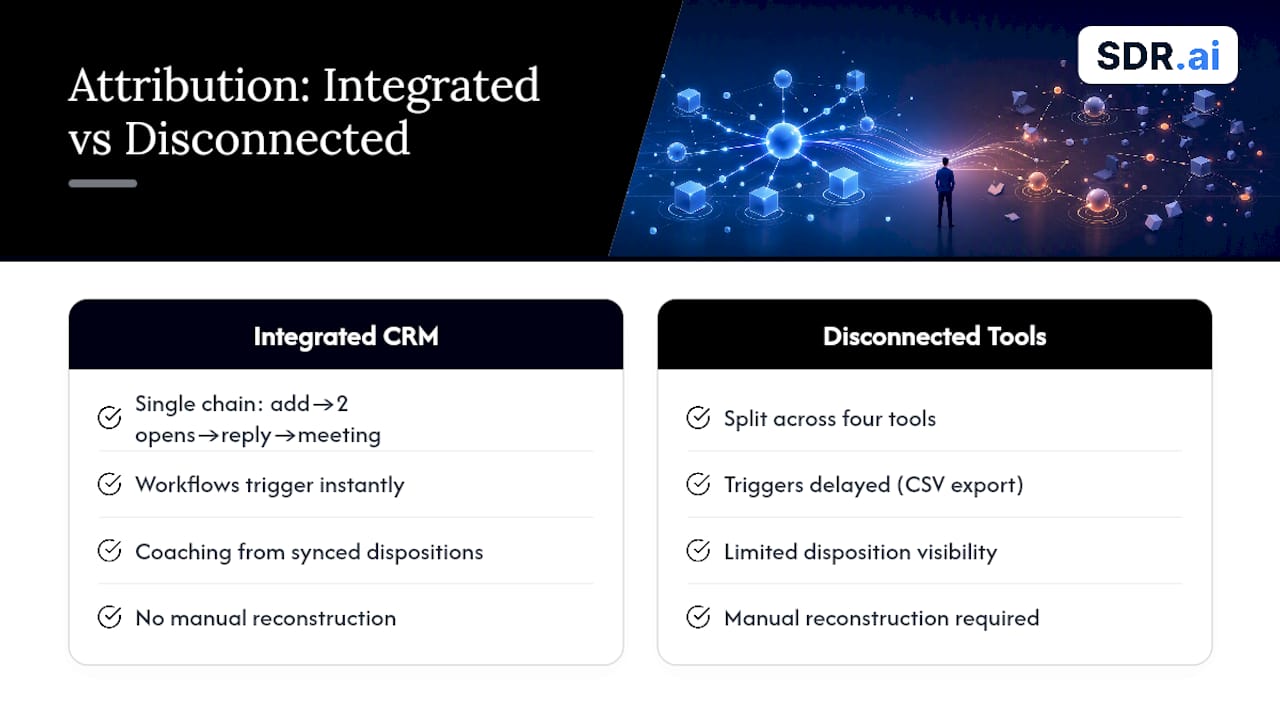
There's a coaching angle too. Managers reviewing dialer activity and disposition data synced into the CRM can spot which reps are logging soft "no answers" versus genuinely qualifying prospects, without listening to every call. That visibility also feeds capacity planning: if synced call volume per rep is dropping while dials stay flat, something in the workflow, not the headcount, needs fixing.
Pro Tip: Before evaluating any integration tool, pull a week of your current outbound activity and count how many touches never made it into the CRM. That gap is your baseline case for the project.
How Outbound Integrations Actually Work Under the Hood
Four architectural patterns cover almost every outbound CRM integration you'll evaluate, and each comes with real trade-offs sales ops leaders need to weigh before committing engineering time or budget.
- Native two-way sync. Built by the CRM vendor or a close partner, these apps read and write in both directions. HubSpot's LinkedIn CRM Sync writes Sales Navigator activity, notes, InMails, and connection events back into HubSpot records, and Salesforce offers a comparable LinkedIn integration for lead creation and activity logging. Native sync is the lowest-lift option, but it often requires a specific subscription tier. HubSpot's own documentation notes that connecting Sales Navigator requires an Advanced Plus seat before CRM Sync features unlocks.
- One-way writeback. Simpler and cheaper to build, this pushes outbound events into the CRM but doesn't pull CRM data back into the outreach tool. Fine for basic activity logging, but it breaks down fast if reps need CRM context (deal stage, prior notes) while they're dialing.
- Middleware and webhooks. Tools like Zapier, Workato, or a custom webhook listener sit between your outbound platform and CRM, transforming and routing events as they fire. This is the most flexible option for teams running multiple tools (a dialer, an email sequencer, a LinkedIn tool) that all need to land in one CRM, and it avoids a hard engineering dependency on any single vendor's API roadmap.
- Direct API connectors. Built and maintained in house, these give full control over field mapping, retry logic, and event modeling. Salesforce's Data Cloud connector documentation for LinkedIn shows the authentication and allowlisting steps this path requires. It's the most powerful option and the most expensive to maintain.
Identity matching is the quiet make-or-break piece of all four patterns. Every system needs a canonical key, usually email address plus a normalized phone number, to match an outbound event to the right CRM contact or lead. Get this wrong and you'll spend months untangling duplicate records instead of running campaigns.
Event modeling matters just as much. Decide up front whether a call attempt becomes a Task, an Activity, or a custom object in your CRM schema. Salesforce and HubSpot both default to Activity/Engagement objects for basic logging, but high-volume outbound teams often need a custom event object to capture disposition codes, call duration, and recording links without cluttering the standard activity timeline.
What Data Should a Full Outbound Integration Sync?
A mapping workshop with sales ops, RevOps, and whoever owns the CRM schema should walk through this checklist field by field, not object by object. Skipping this step is the single most common reason integrations launch and then quietly break within a month.
Contact and campaign identifiers:
- Email address (normalized, lowercase) and phone number (E.164 format) as the primary match keys.
- Sequence or campaign ID, so every event ties back to the outbound motion that generated it.
- Source attribution field: which list, sequence, or LinkedIn campaign originated the contact.
Call-specific fields:
- Call outcome/disposition (connected, voicemail, no answer, bad number, do-not-call request).
- Call duration and timestamp, tied to the rep who made the dial.
- Recording URL or reference ID, stored as a link field rather than the raw file, to keep CRM records lightweight.
Deliverability and compliance flags:
- Bounce type (hard vs. soft) and bounce timestamp.
- Unsubscribe and opt-out status, synced bidirectionally so a request in one system suppresses activity everywhere.
- Do-Not-Call flag, sourced from both internal requests and any external suppression list you maintain.
Missing even one of these, especially the opt-out and DNC fields, creates compliance exposure the moment your integration scales past a handful of reps.
What Should You Look for When Evaluating an Outbound Integration?
Not every integration vendor or build approach clears the bar for a team running real call and email volume. Split your evaluation into three buckets: functional, operational, and governance.
Functional must-haves:
- Writeback that's reliable enough to trust for reporting, not "usually works."
- Near-real-time sync, ideally under a few minutes of lag between an event firing and it landing in the CRM.
- Configurable field mappings, since no two CRMs use identical schema out of the box.
- Built-in deduplication logic that runs on your chosen identity keys, not just exact-match email.
Operational expectations:
- Automatic retries on failed syncs, with a visible error log admins can check without opening a support ticket.
- Monitoring and alerting when sync volume drops unexpectedly, which usually means something upstream broke.
- Admin controls to pause, resume, or reroute syncs without touching production code.
Security and governance:
- OAuth-based authentication rather than shared static API keys.
- Audit logs showing who changed a field mapping and when.
- Role-based access so reps can't quietly disable sync for their own pipeline.
Pro Tip: Ask any vendor how they handle a failed sync during a rate-limit event. If the answer is "it just retries later" with no visibility into what failed, that's a monitoring gap you'll inherit.
Vendor marketplace listings, including notes on LinkedIn CRM Sync's connectivity limitations, are worth reading closely before you commit. Occasional connectivity drops and one-way sync limits show up even in well-supported native apps, so build in a manual reconciliation check for the first few weeks regardless of which path you choose.
How Do Dialing Modes Affect What Gets Logged in Your CRM?
Dialer choice changes what data actually reaches the CRM, and that matters more than most sales ops leaders expect when they're comparing dialer vendors.
- Preview dialing gives reps full context before each call and logs one attempt per contact reviewed, producing clean, low-volume data that's easy to attribute.
- Progressive dialing auto-dials the next contact the moment a rep finishes the last call, generating higher call volume with less rep control over pacing, but still one call record per dial.
- Power dialing queues multiple lines per rep and logs attempts faster, which means your CRM needs to handle bursts of near-simultaneous disposition writes without dropping records.
- Parallel dialing places several calls simultaneously and connects the rep only when a human answers, multiplying dial volume several times over per rep hour and requiring the CRM integration to handle a much higher event throughput without lag.
Each dialing mode needs its disposition codes mapped consistently: connected, voicemail, no answer, busy, and do-not-call requests should use the same taxonomy across every dialer a team uses, or your reporting fractures the moment someone switches tools. Call recordings should sync as a link field tied to the call record, not a raw upload, to keep the CRM performant.
AI-dialer setups raise the stakes on concurrency. When a system places calls in parallel and only connects a human on pickup, the CRM integration has to log every dial attempt, not just the ones that connect, or your attribution math on cost-per-connect will be wrong. That data also becomes a coaching signal: a rep with a high connect-to-qualified ratio on AI-dialed calls is worth studying, and that pattern only surfaces if every disposition writes back cleanly.
What's a Realistic Rollout Timeline for a CRM Integration Project?
A rushed integration is how teams end up with six months of unreliable data before anyone notices the sync has been silently dropping records. Follow a phased approach instead.
- Inventory and stakeholder alignment (Week 1). Get sales ops, RevOps, IT/security, and a rep representative in one room. Document every tool currently touching outbound activity, email sequencer, dialer, LinkedIn tool, and confirm who owns each system's admin access.
- Field-mapping workshop (Week 2). Build the mapping template from the checklist above: which outbound field maps to which CRM field, and what happens on a conflict (last-write-wins, or a manual review queue for high-value fields like deal stage).
- Test plan and edge cases (Weeks 2 to 3). Explicitly test duplicate contact handling, reply routing when a prospect replies from a different email address than the one dialed, and what happens when a bounce and an open fire in the same session.
- Pilot with one team (Weeks 3 to 5). Run the integration live with a single pod, five to ten reps, and compare synced records against a manual log for at least two weeks before trusting the automation.
- Phased rollout (Weeks 6 to 9). Expand team by team, watching sync error rates and reconciling any mismatches before adding the next group.
- Enforcement and monitoring (Ongoing from Week 10). Turn on alerting for sync failures, schedule a monthly audit of dedupe accuracy, and revisit field mappings any time either system changes its schema.
Budget for engineering time even on a "native" integration. Someone still has to configure mappings, test edge cases, and own the response when a vendor changes their API. A structured implementation playbook can shorten this timeline considerably if your team is building the mapping and testing process from scratch.
What Compliance Rules Apply to Outbound Calling and Email Data?
Outbound calling sits under real regulatory scrutiny, and a CRM integration is actually one of your best compliance tools if it's built with auditability in mind. The FTC's Telemarketing Sales Rule guidance requires businesses to maintain records that demonstrate compliance, including call logs and consent documentation, which is exactly what a properly synced dialer integration produces automatically.
Do-Not-Call and opt-out data needs to sync bidirectionally between your outbound tools and your CRM, not live in a spreadsheet someone updates weekly. If a contact opts out through your email sequencer, that flag has to suppress future calls too, and vice versa. A gap here isn't just a compliance risk, it's a customer experience failure that damages your sender reputation.
Deliverability guardrails deserve the same engineering attention as compliance fields. Bounce handling needs to distinguish hard bounces (permanently suppress) from soft bounces (retry with back off), and rate limits on both email sending and dialing need to respect the receiving domain's or carrier's thresholds. Domain reputation signals, spam complaint rates, bounce rates, and engagement rates all degrade fast if your integration keeps pushing volume through a list that hasn't been cleaned of hard bounces and opt-outs.
What Are the Most Common Mistakes Teams Make With Outbound Integrations?
BCC-only logging is the pitfall that causes the most downstream damage, because it feels like it's working right up until someone tries to run an attribution report and finds half the reply data missing. Test for it directly: pick ten recent replies and check whether each one has a corresponding structured event in the CRM, not just a raw email thread.
Duplicate records come next. Loose identity matching, say, matching only on first and last name, creates duplicate contacts every time a prospect uses a slightly different email format. Tighten your matching keys to email plus normalized phone number before launch, not after you've got thousands of duplicate leads to merge.
- Test BCC-based logging against a sample of known replies before trusting it for reporting.
- Set matching rules on normalized email and phone, never on name alone.
- Monitor sync volume weekly for the first two months and investigate any unexplained drop.
- Alert on failed writebacks immediately, not in a monthly report nobody reads.
How SDR.ai Handles Outbound-to-CRM Activity in Practice
SDR.ai's own outbound motion runs on the same principle this article has been building toward: every touch has to land somewhere a manager can see it, or it doesn't count. LinkedIn outreach and AI-dialer activity, connection requests, replies, call attempts, dispositions, get written into the CRM as structured events, not logged after the fact from memory.
That structure is what lets the system prioritize outreach based on intent signals instead of a static call list. A prospect who opens three messages and views a profile twice ranks differently than a cold contact sitting untouched for a week, and that ranking only works if the underlying activity data is complete and current.
Clients working with AI-powered outbound services have reported booking a significant number of qualified meetings each month with a lean setup, largely because the system surfaces intent signals the CRM can act on immediately rather than after a weekly manual review.
Configuration details matter here too. The AI-Dialer's parallel dialing writes every attempt, connected or not, back to the CRM for accurate cost-per-connect math, and a human SDR handles every reply so nothing that requires judgment gets routed to a script.
What Should You Fix First in Your Outbound Stack?
Start with the leak, not the shiny feature. Pilot a structured writeback on one channel, email or dialer, and compare it against a week of manual logs before touching anything else. If it's dropping more than a handful of events out of a few hundred, fix that before adding a second integration on top of a broken foundation.
Block list sync is the second quick win, and it's non-negotiable given the compliance stakes. Map dispositions third: standardize your call outcome codes across every tool before scaling call volume, because retrofitting taxonomy after six months of inconsistent tagging is miserable work.
Reach for middleware or a managed partner when your team lacks the engineering bandwidth to maintain a direct API connector. Build in house only when your event volume or custom object needs genuinely outgrow what native apps and webhooks support.
For 30/60/90 day metrics, track sync accuracy first (30 days), then attribution completeness from first touch to booked meeting (60 days), then rep-level coaching signal quality from disposition data (90 days).
— Chad
Ready to Move Past DIY Integration Work?
If you've read this far, you already know that building and maintaining a reliable outbound integration takes real engineering time, ongoing monitoring, and a compliance-minded approach most sales teams don't have spare capacity for. SDR.ai handles that groundwork as part of a managed outbound engagement: LinkedIn-first outreach, AI-dialer calling, and structured CRM writeback, all running on signal-driven targeting that focuses effort only on your ideal customer profile.
The AI-Powered Outbound service pairs a human SDR with the automation layer this article has walked through, so replies get handled by a person while dialing, sequencing, and disposition logging run without manual entry. Teams that want the framework without the managed service can start with Sdr, a playbook for building the same data, digital, and dials engine in house. And if you're evaluating dialers specifically, the AI-Dialer is available as a standalone SaaS tool your existing team can run on its own.
Ready to see it working on your own pipeline? Book a demo and walk through how the integration and outreach model would fit your outbound stack.
Where to Go for Implementation and Compliance Details
Engineers scoping a build should start with the FTC's telemarketing compliance guidance for the regulatory baseline, then move to vendor docs for the specific systems in play. HubSpot's LinkedIn CRM Sync documentation and Salesforce's LinkedIn integration pages cover native sync setup, permissions, and field mapping in detail. For background on CRM as a category, Wikipedia's CRM overview is a reasonable starting point. Teams thinking about downstream automation after integration should also look at lead nurturing strategies and human-in-the-loop automation for how to keep a human checkpoint in an increasingly automated workflow.
FAQ
What Is CRM Integration?
CRM integration connects your CRM to the other tools your team uses, email sequencers, dialers, LinkedIn, so activity from those systems writes into CRM records automatically. For outbound teams specifically, that means sends, replies, opens, and calls become structured, reportable data instead of scattered notes.
What Is the Best Software for Outbound Calling?
The right choice depends on call volume and team size: preview and progressive dialers suit smaller teams needing rep control, while power and parallel dialers fit high-volume outbound motions. SDR.ai's AI-Dialer uses parallel dialing to multiply connect rates per rep hour while writing every attempt back to the CRM for accurate attribution.
What Are the Top CRM Tools for Outbound Sales Teams?
Salesforce and HubSpot are the two most widely used platforms among outbound teams, largely because both offer native LinkedIn integrations and mature developer ecosystems for custom connectors. Beyond the CRM itself, teams typically pair one of these with a dedicated dialer and sequencing tool connected through native sync, middleware, or a direct API.
What Are the Four Types of CRM?
CRM systems are commonly grouped into operational (day-to-day sales and service management), analytical (reporting and data analysis), collaborative (sharing customer data across teams), and strategic (long-term customer relationship planning). Most outbound teams interact primarily with the operational layer, since that's where sequence, call, and reply data lands.
How Do I Integrate a CRM for Outbound Sales?
Start with a field-mapping workshop covering contact identifiers, call dispositions, and opt-out flags, then choose an architecture: native app, middleware, or direct API, based on your team's technical resources. Pilot with one team for two to three weeks, comparing synced data against manual logs, before rolling out phase by phase across the wider sales organization.