
Yes, you can automate LinkedIn outreach safely and scale it without getting an account restricted, but only with multichannel sequences, strict daily send limits, and human-like sending behavior. Teams doing this in-house need real operational discipline. Teams that want guaranteed meetings without building that discipline themselves should consider a managed AI SDR service like Sdr, which handles targeting, personalization, and calling as one system.
TL;DR:
- Using multichannel sequences that include LinkedIn, email, and calls can significantly improve response rates compared to LinkedIn-only outreach.
- Proper account warming, setting conservative daily limits, and randomizing action timings are essential to avoiding LinkedIn account restrictions.
- Vendors should support true multichannel orchestration, AI-personalized outreach, CRM integration, and transparent performance metrics for safe scalability.
- Launching a DIY campaign typically requires six to eight weeks for initial setup, warming, testing, and stabilization, while managed services can cut this time significantly.
- Small teams with immediate goals benefit from managed AI SDR services, which offer predictable results and lower ramp-up risks compared to building in-house outreach capabilities.
Table of Contents
- What Does Safe LinkedIn Outreach Automation Actually Do?
- What LinkedIn Policy and Deliverability Rules Should You Follow?
- How Do You Evaluate a LinkedIn Outreach Provider?
- How Do You Set Up Your First Safe LinkedIn Automation Campaign?
- What Results Should You Expect, and How Do You Verify Vendor Claims?
- What Mistakes Cause LinkedIn Automation Campaigns to Fail?
- Which Other Sales Tools Should LinkedIn Automation Connect To?
- What Does LinkedIn Outreach Automation Cost, Really?
- How Long Does It Take to Launch and Scale LinkedIn Outreach?
- When Should You Hire a Managed AI SDR Instead of Building In-House?
- How SDR.ai Runs LinkedIn-First Outreach and Where to Start
- Where to Learn More
- Sources
What Does Safe LinkedIn Outreach Automation Actually Do?
LinkedIn outreach automation is not one tool sending connection requests on a timer. Done right, it orchestrates a sequence across LinkedIn, email, and phone calls, because relying on a single channel caps your response rate before you even start. Multichannel sequences consistently outperform LinkedIn-only outreach for most B2B use cases, since a prospect who ignores a LinkedIn message might answer a call three days later.
Personalization splits into two tiers. Tokenized personalization drops a first name or company into a template. AI-personalized outreach reads a prospect's recent posts, job changes, or company news, then writes an icebreaker referencing something specific. The second kind converts better, but it needs a data layer behind it, not just a mail-merge field.
On the operational side, a handful of features separate a system built to scale from one that gets an account flagged in week two:
- Multi-sender rotation spreads volume across several LinkedIn profiles instead of hammering one account past its natural limits.
- Shared inbox lets a team see and respond to replies from any sender in one place, so a prospect never gets ghosted because the wrong rep owns that thread.
- CRM sync pushes accepted connections, replies, and booked meetings into your pipeline automatically instead of someone copy pasting into a spreadsheet.
- Webhooks and triggers fire actions in other tools, like starting an email follow up the moment a LinkedIn connection request gets accepted.
A typical campaign flow looks like this: find your ideal prospects, send a connection request with a personalized note, nurture with two or three follow-up messages spaced over days, qualify based on reply content, then hand off to a call or a booking link. Each stage has its own success rate, and a good system tracks all of them separately instead of reporting one blended number that hides where prospects actually drop off.
What LinkedIn Policy and Deliverability Rules Should You Follow?
LinkedIn does not publish a hard number for "safe" daily activity, but the platform's own partner guidance consistently favors measured automation paired with manual oversight over unsupervised, high-volume sending. Treat that as the baseline rule, not a suggestion.
Four controls matter more than any others when you're running outreach at volume:
- Set daily caps well below platform maximums. New accounts should send far fewer connection requests and messages than an aged, well-connected profile can tolerate.
- Randomize delays between actions. A bot that sends 50 messages in exactly six-second intervals is trivially detectable. Human activity is irregular.
- Warm every account gradually. A brand-new profile jumping straight to outreach volume is the fastest way to trigger a restriction, regardless of how good your messaging is.
- Build in automated stop rules. If reply sentiment turns negative or a spam flag appears, the sequence should pause itself, not wait for someone to notice three days later.
Execution model changes your risk profile more than most people realize. Browser-extension tools run inside your actual browser session, which looks more human to LinkedIn's systems but ties execution to your machine being open. Cloud-run platforms execute server-side around the clock, offering more consistency but requiring tighter safety settings since there's no human sitting at the keyboard to notice something going wrong. Desktop software sits in between, with its own update and reliability tradeoffs.
Pro Tip: Run a manual QA pass on your first fifty replies in any new sequence before scaling volume. Automated tools are good at sending messages; they're bad at noticing that three prospects in a row replied "please stop contacting me."
Data handling matters too, even if it's rarely the first question teams ask. Know where your prospect data lives, how long it's retained, and whether your provider's privacy practices match what you're comfortable representing to your own customers.
How Do You Evaluate a LinkedIn Outreach Provider?
Vetting a vendor or managed service comes down to three buckets: what it can technically do, how safely it does it, and what it actually costs you once you account for ramp time.
On the technical side, ask whether the sequence builder supports true multichannel orchestration or just LinkedIn with an email bolt-on. Check personalization depth: does it stop at first-name tokens, or does it use AI personalized icebreakers pulling from a prospect's actual activity. Confirm CRM and analytics integrations exist for the tools you already run, not just a generic export button.
Safety questions deserve equal weight:
- What execution model does the platform use, and what daily caps does it enforce by default?
- Who controls account-level settings, and can you override automated stop conditions if needed?
- What happens when a spam flag or negative reply comes in? Is there a support SLA, or are you on your own?
- How does the provider handle multi-sender rotation for agency accounts managing several client profiles at once?
Commercial diligence is where most buyers rush and regret it later. Ask about the pricing model directly: is it per-seat, per-sender, or a flat retainer, and what's included in a setup fee versus ongoing subscription cost. Request a realistic onboarding ramp timeline, not the best-case number from a sales deck. Before signing anything, ask for trial metrics: acceptance rate, reply rate, and meetings booked from an actual comparable campaign, not an aggregate company-wide average.
Finally, ask for proof you can actually verify. Anonymized dashboards, exportable campaign data, and a live client reference beat a polished case study PDF every time. Third-party review platforms like G2 are also useful for cross-checking a vendor's reliability and support responsiveness against what their sales team tells you.
How Do You Set Up Your First Safe LinkedIn Automation Campaign?
Launching your first campaign without burning your sender accounts or wasting a list on the wrong prospects comes down to five sequential steps.
- Define your ICP and intent signals before touching any tool. Job title and company size are table stakes. Real intent signals, like a recent funding round, a job change, or engagement with relevant content, separate a list that converts from one that just looks big.
- Clean and enrich your list before uploading it anywhere. Bad emails and stale titles inflate your bounce rate and tank sender reputation before the campaign even starts.
- Warm your sending accounts and pilot with a small cohort. Start with a handful of senders at conservative daily caps, watch acceptance and reply rates for a week, then scale the senders that are performing.
- Write a three to four message framework and test variations. A/B test icebreakers and calls to action independently so you know which variable actually moved the needle, not just that "version B did better."
- Wire up CRM tracking and define your conversion events. Meetings booked and sales qualified leads are the metrics that matter; connection rate alone tells you almost nothing about revenue.
Pro Tip: A booking link, like a Calendly page embedded directly in your final message, removes the back-and-forth scheduling friction that kills momentum right when a prospect is warmest. A tested follow-up cadence with clear escalation rules for when to move from message to call performs better than an open-ended sequence with no defined endpoint.
Set your goals before launch, not after you see the first week of data. A campaign targeting 20 meetings a month needs a very different list size and cadence than one targeting five.
What Results Should You Expect, and How Do You Verify Vendor Claims?
Acceptance rates, reply rates, and meeting-booked rates vary widely across industries, list quality, and message relevance, so treat any single benchmark number with suspicion. What drives the variation matters more than the number itself: a tightly defined ICP with real intent signals will outperform a broad, generic list every time, regardless of which tool sends the message.
When a vendor shows you a case study, verify it the way you'd verify any other business claim:
- Ask for the timeframe the results cover. A 90-day case study means something different than a cherry-picked best week.
- Ask for sample size. Ten meetings from a list of 200 prospects tells a different story than ten meetings from 5,000.
- Ask how attribution worked. Did the meeting come directly from LinkedIn outreach, or did a call from an AI dialer close the deal after LinkedIn opened the door?
That last question matters more than it sounds. Parallel dialing combined with LinkedIn sequencing creates a genuinely different conversion path than LinkedIn alone, since it converts prospects who saw a message and never replied but will pick up a phone call. Vendors who blend channels without disclosing the mix can make a LinkedIn-only tool look more effective than it is.
Vendors sometimes present optimistic benchmarks without showing how the numbers were calculated. Always request the underlying dashboard or a CSV export rather than a summary slide. SDR.ai, for its part, publishes its outreach methodology and reports on booked meeting outcomes as part of its standard client reporting, which is the level of transparency worth expecting from any provider you're evaluating.
What Mistakes Cause LinkedIn Automation Campaigns to Fail?
Most failed campaigns share the same handful of root causes, and nearly all of them show up in the data before they show up as an account restriction.
- Over-automation signals appear first in bounce and reject rates. A spike in either usually means volume outran targeting quality.
- Spam reports and cold, generic replies ("who is this?") mean your personalization isn't landing, not that you need to send more messages.
- Data hygiene failures like outdated titles or wrong company sizes waste sends on people who were never going to convert.
- Vendor promises that sound too clean ("guaranteed 30 meetings a month, no ramp period") are a red flag; real campaigns have variance and a ramp curve.
When you see these signs, pause the sequence immediately rather than letting it keep running while you investigate. Re-evaluate your ICP definition, rewrite the messages that are underperforming, and reduce your sending cadence before restarting. A brief pause costs you days. An account restriction costs you the sender entirely.
Which Other Sales Tools Should LinkedIn Automation Connect To?
CRM sync is the baseline integration, but it's rarely the only one that matters once a campaign is actually running at volume. Calendar tools are the most immediate gap: a booking link, like a Calendly scheduling page, embedded in your outreach sequence turns a warm reply into a scheduled meeting without a single back-and-forth email.
Webhook and API connections extend that further. Platforms that expose documented webhooks let you trigger actions in other systems the moment something happens in your LinkedIn sequence, like starting an email nurture flow the instant a connection request gets accepted, or notifying a Slack channel when a reply comes in with buying intent language.
Sales engagement platforms and dialers deserve a direct connection too, not a manual export step. When LinkedIn sequencing and calling share the same data layer, a rep can see that a prospect opened three messages and never replied, then decide to call instead of sending a fourth message into the void. That handoff, done manually, usually just doesn't happen; reps forget, or the data lives in two disconnected systems.
Enrichment tools round out the stack. Feeding fresh intent signals, like job changes or funding announcements, into your sequencing tool keeps your targeting current instead of working off a list that was accurate six months ago. The fewer manual exports and re-uploads your team does between tools, the fewer opportunities exist for a prospect to fall through a gap between systems.
What Does LinkedIn Outreach Automation Cost, Really?
Pricing in this category splits into three rough tiers, and the sticker price on any one tool rarely reflects the total cost of running a campaign.
Self-serve automation tools typically charge per seat or per sender, often in the range most SMB teams can absorb without approval from finance. That number looks attractive until you add up the hours someone on your team spends building sequences, monitoring safety settings, cleaning lists, and reacting to replies, none of which shows up on the invoice.
Mid-market platforms add multichannel orchestration and team features at a higher per-seat cost, usually bundled with onboarding support that reduces the ramp time compared to a pure DIY setup.
Managed services, where a provider runs the entire operation, typically charge a monthly retainer plus a setup fee. The retainer covers targeting, message writing, sending, and reporting as a complete package rather than a tool you still have to operate. The real comparison isn't retainer cost against seat cost. It's total cost, including the internal hours a DIY setup consumes, against a fixed monthly number where someone else owns the ramp curve, the safety monitoring, and the list building.
Scaling costs also differ by model. Adding senders to a DIY tool means buying more seats and warming more LinkedIn accounts yourself. Scaling a managed engagement usually means a conversation about volume targets, since the provider already owns the sending infrastructure.
How Long Does It Take to Launch and Scale LinkedIn Outreach?
A realistic DIY timeline runs longer than most teams expect going in. Week one is ICP definition and list building. Weeks two and three involve account warming, since a new or lightly used LinkedIn profile needs a gradual ramp before it can handle real outreach volume without tripping platform limits. Message testing typically takes another two to three weeks before you have enough reply data to know which framework is actually working. Altogether, a DIY team is usually looking at six to eight weeks before a campaign is running at a stable, safe volume, and that's assuming nothing goes wrong with account restrictions along the way.
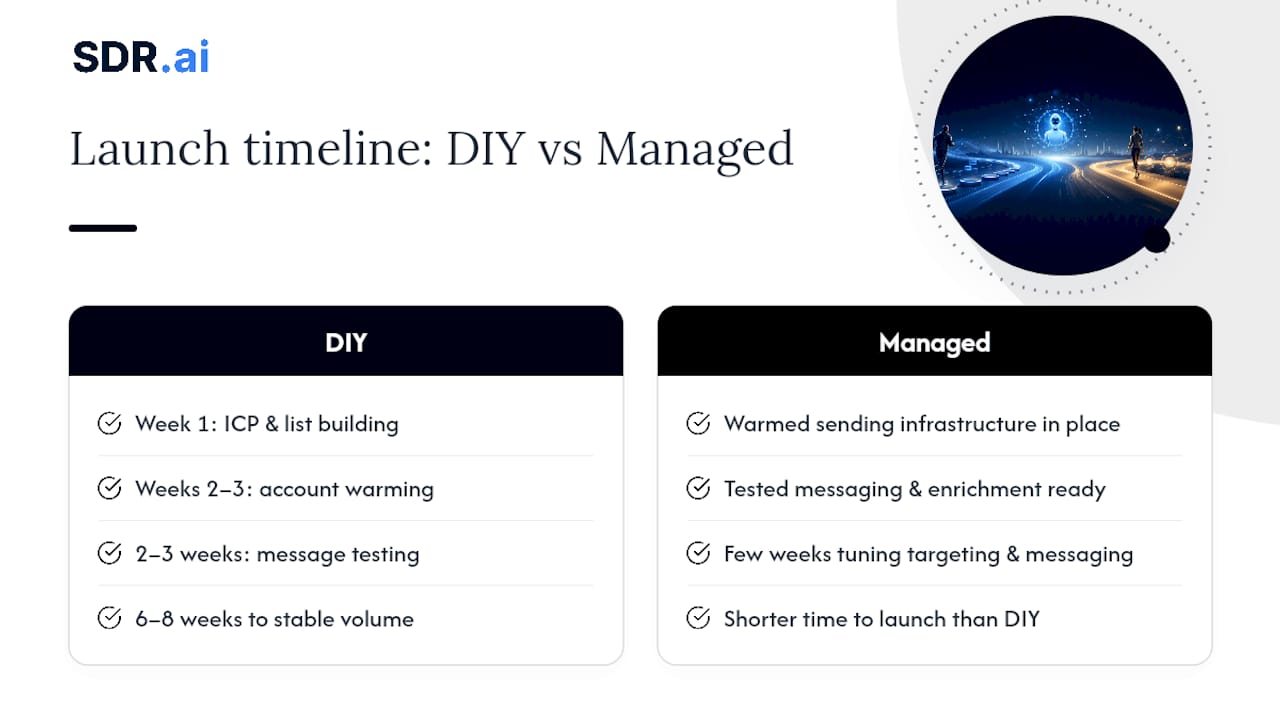
A managed engagement compresses that considerably, since the provider already has warmed sending infrastructure, tested messaging frameworks, and enrichment data in place before your account even goes live. That doesn't eliminate ramp time entirely; even a managed setup needs a few weeks to tune targeting and messaging to your specific ICP. But it removes the account-warming bottleneck that eats the first several weeks of a DIY build.
Scaling follows a similar pattern on both paths. Adding volume gradually, whether that's more senders or more calling capacity, protects deliverability better than a sudden jump. Any provider or internal team promising instant scale to high volume with zero ramp period is glossing over the mechanics of how LinkedIn's systems actually respond to sudden activity changes.
When Should You Hire a Managed AI SDR Instead of Building In-House?
Team size and ramp tolerance decide this more than budget does. A small team with no dedicated SDR headcount and a need for meetings booked this quarter, not next, gains little from spending six weeks warming accounts and testing messaging themselves. A larger team with existing sales operations infrastructure and time to iterate can build in-house and retain more control over messaging and process.
The real trade-off is outcome certainty against ongoing cost control. Building in-house means you own every dial and can adjust cost as you go, but you also absorb the ramp time and the risk of a botched account warm-up. A managed service front-loads that risk onto the provider in exchange for a predictable monthly cost.
If you're unsure which fits, run a 90-day pilot with a managed provider alongside a clear definition of success (meetings booked, reply quality, cost per meeting) before deciding whether to bring it in-house later.
— Chad
How SDR.ai Runs LinkedIn-First Outreach and Where to Start
SDR.ai replaces the account-warming, list-building, and message-testing grind with a done-for-you engine built specifically to book meetings, not just send messages. A typical engagement combines AI-driven ICP targeting, personalized LinkedIn messaging, and AI-Dialer calling into a single coordinated cadence, so a prospect who never replies to a message still gets a warm call instead of getting dropped.
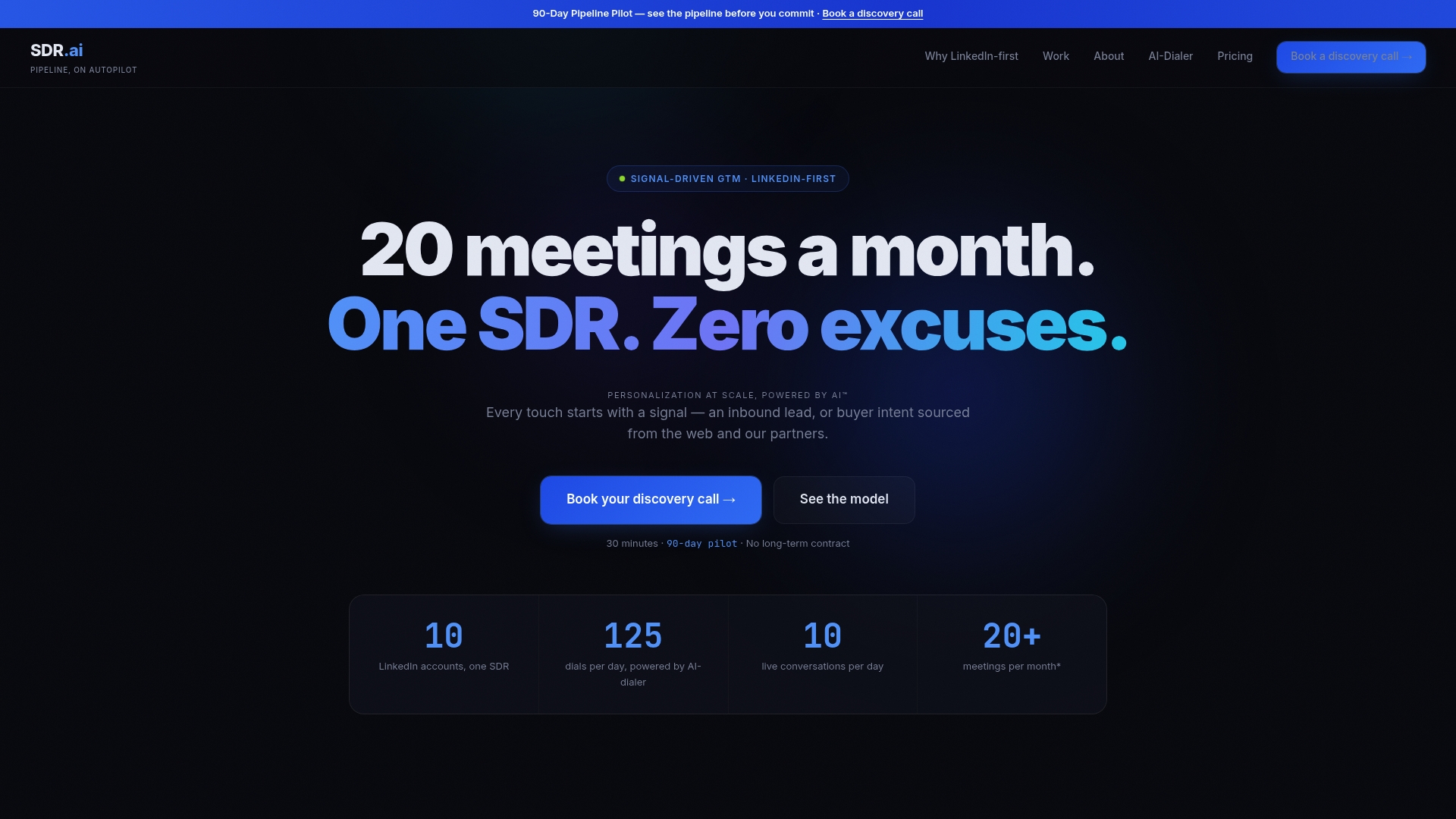
Onboarding is transparent about timing: expect a real ramp period while the system tunes targeting to your specific ICP, not a claim of instant volume on day one. What clients get in return is meaningful once ramped: Sdr with a fraction of the manpower a traditional SDR hire or agency retainer requires. If you're weighing that against building a team internally, the honest comparison between an AI SDR and a traditional SDR agency breaks down the cost and speed differences plainly.
Ready to see whether a managed approach fits your pipeline goals? Book a walkthrough at Sdr and get a straight answer on what your first 90 days would look like.
Where to Learn More
For deeper reading on the mechanics covered here, LinkedIn's own partner content on measured automation combined with manual oversight is worth a full read, as is the sales follow-up workflow guide for cadence design. For implementation details, see SDR.ai's operational blueprint and case outcomes page.
Sources
- n8n Automation Tools for LinkedIn Outreach (LinkedIn top content)
- Sales follow-up workflow: your 2026 guide (Ahead of Sales)