
For most professional outreach, send a connection request with a short note first, and save InMail for private profiles, urgent timing, or contacts worth real money to reach. Connection paths convert more replies overall because they're free and build your network; InMail costs credits but reaches anyone on LinkedIn regardless of connection status. The right call depends on how much the contact is worth and how fast you need a response.
TL;DR:
- Sending connection requests with a note is more cost-effective and builds your network better than sending InMails for cold outreach.
- InMail response rates typically range from 10 to 25 percent but are much lower (around 5.5%) among contacts who already accepted a connection request.
- InMail credits are refunded if the recipient replies within 90 days, making targeted outreach more financially efficient.
- Personalization, brevity, timing, and precise targeting significantly improve response rates for both InMail and messages.
- Using AI-driven tools can automate and optimize outreach sequences, saving time and increasing the likelihood of booked meetings.
Table of Contents
- LinkedIn InMail vs Message: What's Actually Different
- What Response Rates Should You Actually Expect?
- How Much Does InMail Cost, and When Do Refunds Kick In?
- When Should You Use InMail Instead of a Regular Message?
- How to Write InMails and Messages That Actually Get Opened
- What Mistakes Quietly Kill Your Response Rate?
- How AI-Augmented Outreach Combines Both Channels
- A Simple Weekly Checklist for LinkedIn Outreach
- A Faster Path to Booked Meetings Than Managing Channels Yourself
- Sources
LinkedIn InMail vs Message: What's Actually Different
The core difference is reach. A regular LinkedIn message only goes to people you're already connected to, first-degree contacts sitting in your network. InMail breaks that wall. It lets you message any LinkedIn member, whether you're connected or not, which is exactly what LinkedIn Help defines it as: a premium feature built specifically for reaching people outside your network.
That reach isn't free, and the mechanics show it. InMails carry a distinct label in the recipient's inbox marking them as InMail rather than a standard message, so recipients know immediately they're getting outreach from someone outside their circle. Regular messages just look like, well, messages.
A few other technical distinctions matter when you're choosing a channel:
- Subject lines: InMail supports a subject line; regular messages don't have one, they just start with your text.
- Length limits: InMail caps out around 1,900 characters for the body; regular messages allow more, though shorter almost always performs better regardless of channel.
- Open Profile exception: some members enable Open Profile, which lets you message them like a regular connection, no credit required, even without connecting first.
- Free InMail perks: certain Premium and Sales Navigator tiers include monthly InMail credits, and some group memberships or events unlock free InMail sends to specific people.
Understanding these mechanics matters because the decision between InMail and messaging isn't really about preference. It's about who you're trying to reach and what that access costs you.
What Response Rates Should You Actually Expect?
InMail typically lands a response somewhere in a 10 to 25% range, according to benchmarks compiled by LinkedInsider. That's the number most sales and recruiting teams anchor to when setting expectations.
But raw InMail performance looks weaker next to the full connection funnel. A dataset from Noon AI measured a 34.2% reply rate among people who accepted a connection request and then received a follow-up message, compared to a 5.5% reply rate for InMail in that same sample. The gap is stark, and it changes how you should think about sequencing.
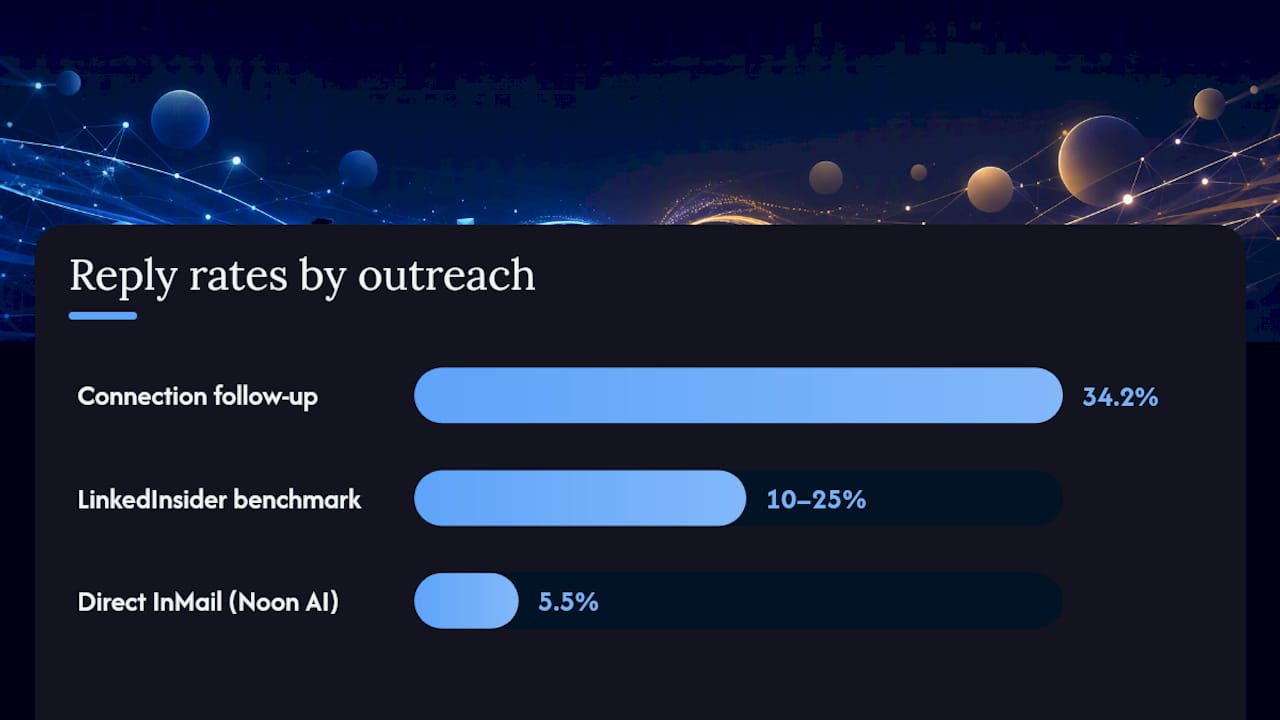
Here's the nuance, though: those two numbers measure different things. The 34.2% figure only counts people who already said yes to connecting, a self-selected group more receptive by definition. Compare like with like and InMail still holds real value for reaching people who'd never accept your connection request in the first place.
What actually moves these numbers:
- Personalization: A subject line referencing something specific to the recipient outperforms generic openers by a wide margin.
- Length: Messages under roughly 400 characters get notably higher response rates than longer ones, per research LinkedIn has cited in its own guidance.
- Timing: Tuesday through Thursday sends tend to outperform Monday and Friday, and Autoposting notes that 65 to 90% of responses arrive within the first week regardless of channel.
- Targeting precision: A response rate under 10% on a decent-sized send usually points to a targeting problem, not a copywriting one.
The fix is almost always who you're messaging, not what you're saying.*
How Much Does InMail Cost, and When Do Refunds Kick In?
InMail runs on a credit system. LinkedIn allocates a set number of credits monthly depending on your plan tier, Premium Career, Premium Business, Sales Navigator, and Recruiter all come with different allotments. Send an InMail, spend a credit.
Here's the part that changes the math: LinkedIn refunds the credit automatically if the recipient replies within 90 days, according to LinkedIn's own documentation. So a well-targeted InMail that gets a response effectively costs nothing. A poorly targeted one that gets ignored is a sunk cost.
That changes how you should budget credits:
- Reserve credits for named, high-value accounts rather than spraying them across a broad list.
- Buying extra credits makes sense when you've got a short list of accounts worth real deal value and you're out of monthly allotment.
- Buying extra credits rarely makes sense for volume outreach, since connection requests do that job for free.
- Response rate is an operational metric, not just a vanity number. LinkedIn Recruiter applies seat-level thresholds, and consistently low reply rates at scale can trigger platform warnings or sending restrictions.
Treat credits like a limited budget line, not an unlimited outreach tool, and the InMail vs message calculation gets a lot simpler.
When Should You Use InMail Instead of a Regular Message?
Default to connecting first. Send a connection request with a short, specific note, and if it's accepted, follow up with a regular message. This costs nothing, builds your network for future outreach, and the Noon AI data backs it as the higher-converting path overall.
Three situations flip that default:
- The profile is private or heavily filtered. Some people restrict who can even send a connection request. InMail bypasses that entirely.
- The contact is high-value enough to justify the credit. A single enterprise decision-maker or a passive candidate for a hard-to-fill role is worth spending a credit on, especially with the 90-day refund safety net if they reply.
- Timing is urgent. If you need a response this week, not next month, InMail skips the wait for a connection to accept.
For recruiters working passive candidates, InMail often makes sense as the first touch since many passive candidates never accept cold connection requests anyway. For job seekers reaching out to hiring managers, the opposite usually applies: a connection request with a genuine note tends to land better and costs nothing.
On sequencing, give a connection request three to five business days before you escalate. If it's ignored and the contact is worth it, that's your signal to spend an InMail credit rather than sending a second connection request, which LinkedIn won't even allow.
Pro Tip: Run the math per contact, not per campaign. If a role or deal is worth five figures, one InMail credit is a rounding error. If you're prospecting a list of 200 mid-level contacts, connection requests are almost always the better economics.
How to Write InMails and Messages That Actually Get Opened
Subject lines carry more weight than most senders realize. Keep them under 8 to 10 words and specific, referencing the recipient's role, a mutual connection, or something from their recent activity. "Quick question about your team's hiring plans" beats "Opportunity" every time.
Structure the body in three parts:
- A personalized opener that proves you actually looked at their profile, not a templated line that could apply to anyone.
- One line of credibility explaining why you, specifically, are reaching out, not a paragraph of your résumé.
- One clear ask, a single next step, not three options buried in a wall of text.
Keep the whole message under 400 characters where possible. Most people read LinkedIn on their phones, and a message that requires scrolling loses attention before it earns a reply.
Pro Tip: Write your first draft, then cut it by a third. Almost every InMail that underperforms is trying to say too much before asking for anything.
On follow ups, wait at least four to five days before a second touch, and make it additive, a new piece of information or a different angle, not just "following up on my last message." A meaningful follow-up references something new; a nagging one just repeats the ask.
What Mistakes Quietly Kill Your Response Rate?
Bulk-sending the same template to hundreds of contacts is the fastest way to tank performance. Response rates decay noticeably once a message stops feeling personal, and LinkedIn's own systems can flag accounts that send at high volume with low engagement.
Common execution errors worth watching for:
- Channel mismatch: sending InMail to someone who would've happily accepted a free connection request.
- Poor targeting: a technically well-written message sent to the wrong title or seniority level.
- Bad timing: sends that land late Friday or over the weekend, when open rates drop.
- Over-messaging: following up more than twice without a new angle, which reads as pressure rather than persistence.
If you've tried both channels and neither is converting after two or three attempts, that's usually the signal to move to email or a phone call rather than trying a third LinkedIn touch.
How AI-Augmented Outreach Combines Both Channels
The pattern that works at scale mirrors what the data already shows: connect first, reserve InMail for the contacts worth it, and layer in intent signals so you're not guessing who those contacts are. That's the operational model behind SDR.ai's approach to LinkedIn outreach, using AI to flag which prospects show buying intent before a credit or a connection request ever goes out.

For a solo recruiter or job seeker, doing this manually is manageable. For a sales team trying to hit a pipeline number every month, manually cross-referencing intent data against a target list eats hours that could go toward calls. That's usually the point where teams weigh building this in-house against handing sequencing and targeting to an AI SDR built for exactly this workflow.
A Simple Weekly Checklist for LinkedIn Outreach
Here's how I'd structure a week of outreach if I were running it myself: a batch of connection requests early in the week, personalized messages to anyone who accepted from the prior batch, and two or three reserved InMails for contacts who fit the private-profile or high-value criteria.
Watch one number: your InMail response rate.
Request extra credits only when your list of qualified, high-value accounts outgrows your monthly allotment. If your response rate is low and your credits are running out, that's a targeting problem, not a budget problem, and buying more credits won't fix it.
— Chad
A Faster Path to Booked Meetings Than Managing Channels Yourself
Running the connect-first sequence, tracking response rates, and reserving InMail credits for the right accounts works, but it takes hours every week that most sales teams don't have. SDR.ai handles that entire workflow with AI that identifies intent signals first, so outreach targets prospects already showing buying behavior instead of a cold list sorted by guesswork.
The AI-Dialer extends that same logic to calls, layering warm dialing on top of LinkedIn messaging so a prospect who doesn't reply to a message might still pick up the phone. Clients using this combined approach have booked over 20 qualified meetings a month with a fraction of the manpower a manual sequence requires. If you're weighing whether to build this process in-house or hand it to a system built for it, the comparison between an AI SDR and a traditional agency lays out the tradeoffs plainly. To see the targeting and sequencing in action, book a demo and get a read on what it would look like for your pipeline.
Sources
- InMail Messages | LinkedIn Help
- InMail vs Connection Request: Which Gets Recruiters More Replies? — Noon AI
- LinkedIn InMail Response Rate: 2026 Benchmarks | LinkedInsider
- Autoposting