Write a short, specific connection note when you're reaching out to someone for a real reason, and skip the note for broad, low-effort networking where a blank request will do. The formula that works every time: name the context, point to one real thing about them, then give a soft, pitch-free reason to connect.
TL;DR:
- Personalization should focus on one specific detail from their recent activity, company milestone, or shared connection to increase acceptance chances.
- Keep connection notes under 200 characters to avoid truncation and ensure the recipient reads the entire message, especially on mobile devices.
- Avoid generic placeholders and double-check every bracketed detail to demonstrate genuine effort and prevent appearing spammy.
- Send follow-up messages within a day or two after acceptance with brief, relevant questions to continue the conversation effectively.
- The success of outreach depends more on targeting the right person at the right time with verified signals than on crafting clever copy.
Table of Contents
- What Should a LinkedIn Connection Note Actually Say?
- Connection Request Templates for Every Common Scenario
- How Do You Personalize a Note Without It Feeling Fake?
- What to Send After They Accept the Request
- The Mistakes That Quietly Kill Your Acceptance Rate
- Why Signal Beats Copy in LinkedIn Outreach
- Sources
What Should a LinkedIn Connection Note Actually Say?
A connection note that works has three moving parts, and skipping any one of them is why most requests get ignored. The first is context: how do you know them, or why are you reaching out now? The second is a specific observation, something you could only know by actually looking at their profile, post, or company. The third is a soft close, a low-pressure line that invites a connection without demanding anything back.
That third part matters more than people think. A note that ends with "would love to connect" reads differently than one that ends with "let's connect if useful." The second gives the recipient an easy out, and paradoxically, that's what makes people say yes.
Here's where length comes in. LinkedIn caps connection notes at 300 characters, but that's the ceiling, not the target. On mobile, previews truncate well before 300 characters, so practitioners recommend staying under roughly 200 to make sure your soft close isn't the part that gets cut off. Think of 300 as the legal limit and 200 as the version that actually gets read in full.
A few structural rules make the formula work in practice:
- Lead with the specific detail, not a greeting. "Saw your post on churn modeling" beats "Hi, hope you're well."
- Skip your own introduction unless your headline doesn't already say who you are. If your headline reads "VP Sales at Acme," you don't need a second sentence explaining that.
- Add a one-line identity marker only when your name or headline gives no clue why you're reaching out. A recruiter messaging a passive candidate, for example, often needs to state the role in one clause.
- Never end with a question that requires a paragraph-long answer. Save that for the first DM after they accept.
The structure itself, context leading to one observation leading to a soft close, shows up across most high-performing note libraries, and for good reason: it forces you to prove you did five seconds of homework before you asked for someone's attention.
Connection Request Templates for Every Common Scenario
These are built to be edited, not copied. Every bracket needs a real detail swapped in before you hit send, because a template with visible placeholders is worse than sending nothing.
-
Colleague at the same company. "Hi [Name], we haven't worked directly together but I see you on the [team/project] threads a lot. Connecting so we're linked here too." Replace the team or project name with something you've actually seen mentioned.
-
New colleague, just joined. "Welcome to [Company], [Name]! Saw you're joining the [department] team. Connecting ahead of meeting in person." Swap in their actual department, not a guess.
-
Former coworker. "Hey [Name], it's been a while since [Company/Team]. Saw you're now at [New Company], congrats on the move. Let's stay connected." The specific former company or team name is what separates this from spam.
-
Event contact. "Good meeting you at [Event Name] yesterday, [Name]. Enjoyed the chat about [specific topic you discussed]. Connecting here." The topic detail is non negotiable, it's the entire proof you actually talked.
-
Content engagement or author. "Your post on [specific topic] got me thinking about [your specific reaction]. Would like to keep following your work here." Reference the actual argument they made, not just "great post."
-
Someone you admire from a distance. "I've followed your work on [specific project, talk, or publication] for a while. Would appreciate connecting to keep learning from your posts." Name the actual project or talk, not a vague compliment.
-
Recruiter reaching out to a candidate. "Hi [Name], your background in [specific skill or project] caught my eye for a role I'm hiring for at [Company]. Open to connecting to share details?" Specificity about the skill beats a generic "great profile."
-
Fellow alumnus. "Fellow [School Name] grad here, class of [year if relevant]. Saw you're in [industry/role] now, would like to connect with other alumni in the space." The school and one detail about their current role make this feel earned.
-
Mutual group member. "We're both in [Group Name] on here. Saw your comment on the [specific thread]. Connecting since we're clearly in the same circles." Reference the actual thread, not just "the group."
-
Direct, no-pretext note. "Hi [Name], I don't have a specific reason beyond wanting to grow my network with people in [industry/role]. Happy to connect if that's mutual." This one skips the observation step entirely and says so honestly, which works better than faking one.
Pro Tip: If you can't find one real, specific detail in under 30 seconds of scanning a profile, send a blank request instead. A generic note with the brackets barely disguised performs worse than no note at all, because it signals you didn't actually look.
How Do You Personalize a Note Without It Feeling Fake?
Fake personalization is any note that could have been sent to a thousand other people with one word changed. Recipients spot it fast, usually within the first clause, because the detail is either too generic ("great profile!") or structurally identical to every other cold note they've gotten that week. Visible merge tag errors and generic scaffolding are the most obvious tells, and once someone notices one, they read the rest of the note skeptically.
Three signals consistently produce a real detail in under a minute:
- Their most recent post or comment, especially if it has a specific claim or number in it.
- A company milestone: a funding round, a product launch, or a named new hire you can reference.
- A mutual connection or shared event, which works because it's independently verifiable, not just something you claim.
Scaling this without turning it into surveillance is a real design choice. Some lightweight drafting tools, like browser extensions that generate one note per profile from visible page text, can speed up the "find one detail" step, but the good ones never auto-send. They draft, you review, you send. That distinction, generate then review versus generate then blast, is the entire difference between personalization and its counterfeit.
Acceptance rates on targeted requests commonly land in the 20 to 40 percent range, and the variation between senders comes down almost entirely to how good the targeting is, not how clever the copy sounds. A mediocre note to the right person still beats a great note to the wrong one.
What to Send After They Accept the Request
Timing matters here more than most people account for. Send your first message within a day or two of acceptance in most cases. Wait longer and the context from your note has gone cold. The first DM should run one to three short sentences and end with exactly one question, not three.
Templates that pick up the thread from the note itself work better than starting over:
- "Thanks for connecting! Curious how [the specific thing you mentioned in the note] is going, given [related context]?"
- "Appreciate the connect. Since you're working on [topic from their post], would you be open to swapping notes sometime?"
- "Glad to connect. Noticed [company milestone] recently, how's that changed priorities on your end?"
A well-timed follow-up sequence treats the connection note as step one of a conversation, not a closed transaction. Some practitioners also swear by a short voice note, under 30 seconds, as a first follow-up, since it's harder to ignore than plain text and builds rapport faster than another paragraph would.
Escalate to email or a meeting ask only after there's been a real back and forth, usually two or three exchanges. Jumping straight from "thanks for connecting" to "got 15 minutes this week?" undoes the goodwill the note just built.
The Mistakes That Quietly Kill Your Acceptance Rate
The most common failure isn't a bad idea, it's a bad execution of a good one. A note that still shows "{{first_name}}" or "[Company]" unedited is worse than no note. So is a first line that pitches a product before any context exists. Overlong notes that get truncated mid-sentence look sloppy, and vague flattery like "impressive background!" reads as filler because it says nothing specific.
Before sending, run three checks:
- Did I replace every bracket with a real, verified detail?
- Does this note avoid asking for anything beyond the connection itself?
- Would this still make sense if I read it out loud to the person's face?
Also worth knowing: sending too many connection requests too fast can trigger LinkedIn's own limits, so pace your outreach rather than batching hundreds in one sitting.
Why Signal Beats Copy in LinkedIn Outreach
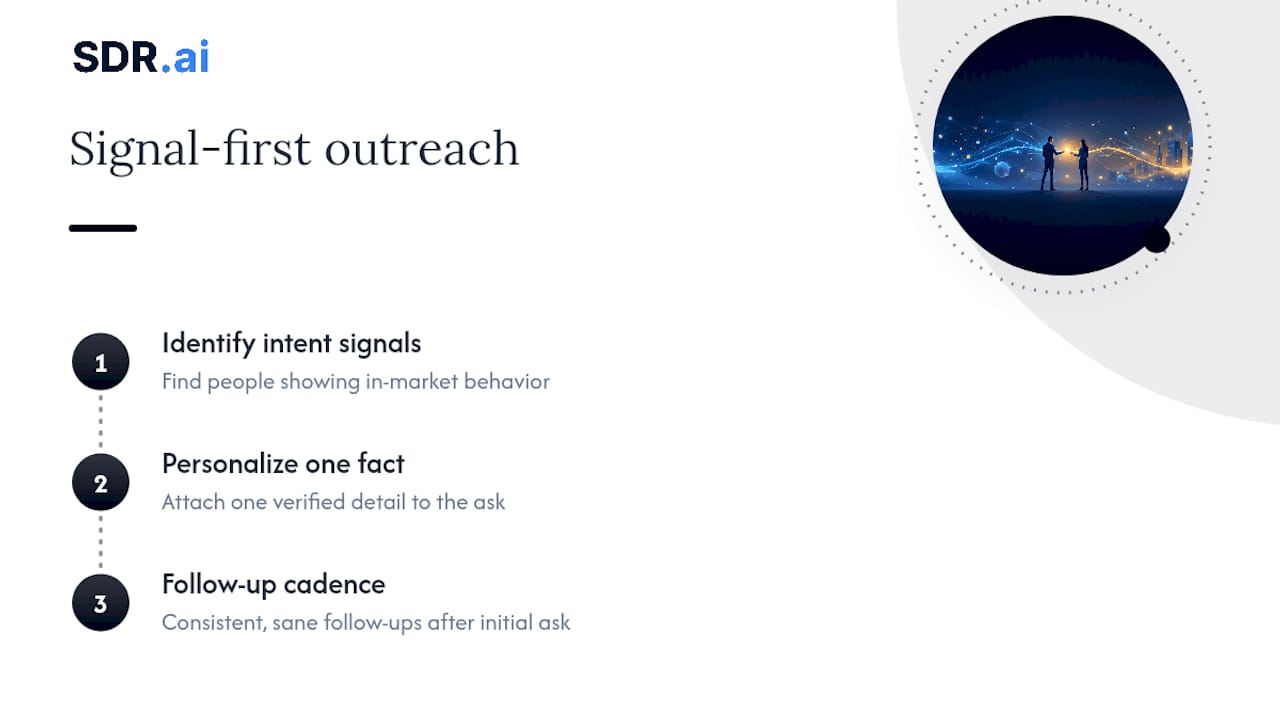
The clever line in a connection note matters far less than people assume. What actually drives replies is targeting the right person at the right moment, then attaching one true fact to the ask. At Sdr, the outreach we build for clients follows that order deliberately: identify intent signals first, personalize around a single verified detail second, and follow up on a sane cadence third.
Copy polish is the part everyone obsesses over because it's the easiest to control. Targeting is the part that actually moves acceptance and reply rates, and it's harder, because it requires knowing who is actually in-market before you write a word. Our signal-based approach to outreach exists because chasing better sentences is usually solving the wrong problem.
— Chad
If you're spending hours per week hand-crafting notes that still land flat, the bottleneck usually isn't your writing. Sdr builds AI-driven outreach that identifies who's actually showing buying signals before a note ever gets sent, then personalizes around one real detail at scale, without the merge-tag giveaways that torch reply rates. Clients can often see a significant number of qualified meetings each month running on this model with less manual effort than a full-time SDR requires. See how the method works or compare it against hiring a traditional SDR agency before you decide where to spend the next quarter's outreach budget.
Sources
- LinkedIn Connection Message Templates That Actually Work
- LinkedIn Connection Request Messages in 2026: What Gets Accepted (and Replied To)
- Personalize invitations to connect | LinkedIn Help