
A call disposition code is a short, standardized label an agent or system applies at the end of a call to record how it ended and what happens next. It converts a vague conversation into structured data your reporting and automation can actually use. Done well, disposition tracking turns wrap-up notes into cleaner dashboards, faster follow-ups, and better coaching.
TL;DR:
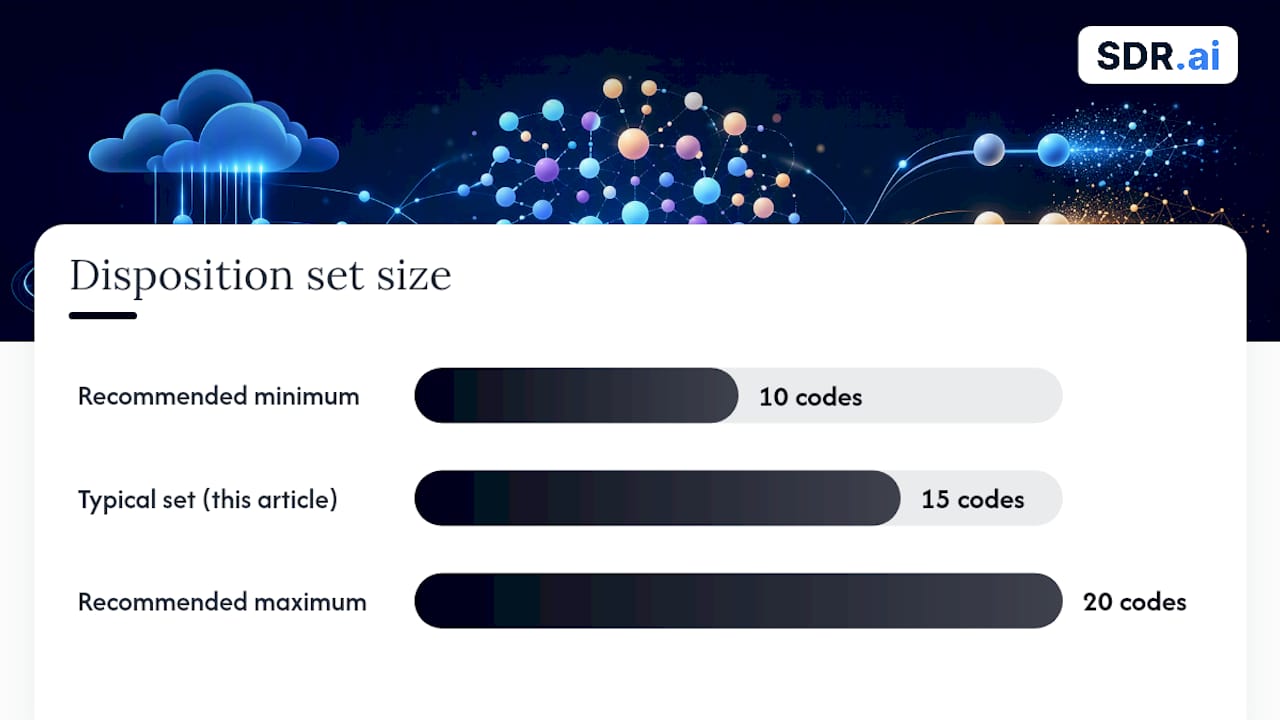
- Disposition codes should be limited to 10 to 20 well-defined, mutually exclusive options to ensure accurate reporting and prevent code sprawl.
- Combining the use of a short, structured set of codes with detailed notes enables both scalable data analysis and context-specific insights.
- Automating actions based on specific disposition codes, such as updating CRM fields or scheduling follow-ups, enhances operational efficiency.
- Clear governance and regular review of disposition lists prevent code fatigue and maintain data quality over time.
- AI-powered tools can reduce manual wrap-up time by pre-populating likely dispositions through real-time transcription and intent detection.
Table of Contents
- What Are Call Disposition Codes, and How Do They Differ From Notes?
- Disposition Code Categories Every Contact Center Should Have
- Reference Codes: How Cisco, Azure, and Google Cloud Handle Terminations
- Building a Disposition Taxonomy That Actually Holds Up
- Wiring Dispositions Into ACD, IVR, CRM, and Automation
- The KPIs That Depend on Clean Disposition Data
- Reading Telephony End Codes When Something Goes Wrong
- What Operations Teams Get Right in Practice
- When Dispositions Are Enough, and When You Need More
- An Alternative Way to Cut Disposition Workload: AI Dialing
- Sources
- FAQ
What Are Call Disposition Codes, and How Do They Differ From Notes?
A disposition code is not the same thing as a free-text note, and treating them interchangeably is where a lot of contact centers go wrong. A disposition is a predefined, selectable label, usually chosen from a dropdown in the agent's wrap-up pane, that classifies the outcome of a call: "Resolved," "No Answer," "Callback Requested." A note is unstructured commentary an agent types alongside it. You need both, but only one of them is queryable at scale.
Google Cloud's contact center documentation describes this distinction clearly: disposition codes and lists are short, predefined labels agents apply during wrap-up, and they get organized into disposition lists tied to specific session types, whether that's inbound voice, outbound dialing, or chat. A retail queue and a collections queue might need entirely different lists, even inside the same platform.
A few concepts matter here:
- Disposition list: the set of codes available to an agent for a given queue or interaction type.
- Default list: a fallback set applied when no queue-specific list exists.
- Wrap-up pane: the interface where agents select a disposition after hanging up.
- Session type: inbound, outbound, or chat, each of which may warrant its own list.
Free-text notes feel more natural to write, but they're miserable to report on. You can't build a dashboard around a hundred different phrasings of "customer wasn't interested." Standardized codes fix that by giving every call a value that fits neatly into a pivot table, a CRM field, or an automation trigger.
Disposition Code Categories Every Contact Center Should Have
Most disposition sets fall into six practical buckets: sales outcome, support resolution, contact quality, appointment status, escalation, and callback. Building your taxonomy around these categories, rather than starting from scratch, keeps things organized and prevents the code list from sprawling into chaos within a few months.
Here's a working set of codes you can adapt, organized by category:
- Sale Closed — deal completed on this call; triggers CRM stage change.
- Interested, Follow-Up Needed — prospect engaged but needs another touch.
- Not Interested — clear decline; suppress from future outbound lists.
- No Answer — call rang out with no pickup.
- Voicemail Left — message dropped; useful for cadence tracking.
- Wrong Number — contact record needs correction or removal.
- Issue Resolved — support ticket closed on the call.
- Escalated to Tier 2 — handed off; needs ticket creation.
- Callback Scheduled — specific date/time set for a return call.
- Appointment Booked — calendar event created.
- Appointment Canceled — remove from calendar, flag for rebooking.
- Do Not Call Requested — compliance flag, highest priority to action.
- Language Barrier — needs routing to a bilingual agent or interpreter line.
- Abandoned by Caller — caller hung up before agent connection.
- Duplicate Contact — record already handled; merge or suppress.
That's fifteen codes, and for most operations, that's close to the ceiling you want. Industry guidance on disposition taxonomy consistently points to 10 to 20 well-defined codes as the practical range. Below that, you lose granularity; above it, agents start guessing or defaulting to whatever's at the top of the list.
Pro Tip: If a category genuinely needs more nuance, add a subcode rather than a new top-level disposition. "Not Interested — Price" and "Not Interested — Timing" tell you far more than a generic decline, without doubling the size of your main list.
Reference Codes: How Cisco, Azure, and Google Cloud Handle Terminations
Agent dispositions and system termination codes are two different layers of data, and mixing them up causes real confusion in reporting. An agent disposition tells you what happened from a business perspective, chosen by a human. A termination code tells you what happened at the network or platform level, generated by the system, often before an agent was ever involved.
| Category | Representative Code | What It Signals |
|---|---|---|
| Agent outcome | Resolved / Callback Requested | Business result chosen by the agent |
| Network termination | Abandoned In Network | Caller hung up before reaching a queue |
| Queue termination | Abandoned In Local Queue | Caller hung up while waiting |
| Ring termination | Abandoned Ring | Caller hung up while the phone was ringing |
| Platform end reason | Declined / Timed Out | System-level reason the call session ended |
| IVR-level result | ivrGiveUp | Caller exited the IVR before completing a menu path |
Cisco's UCCE and PCCE platforms populate a Call Disposition field in their termination call detail records, with numeric codes covering scenarios like Abandoned In Network and Abandoned Ring. These are generated automatically and describe the mechanics of call handling, not the agent's business judgment.
Microsoft Azure Communication Services takes a similar approach on the technical side. Its ParticipantEndReason codes and subcodes explain why a call session ended, whether that's a network drop, a token expiration, or an endpoint failure, and each comes with remediation guidance for engineers.
Google Cloud's platform lets you configure disposition lists at both the global and queue level, so a sales queue and a technical support queue can surface entirely different agent-facing options while sharing the same underlying platform.
Healthcare deserves a specific mention. Clinical call centers often need dispositions like "Resolved," "Callback Required," or "Voicemail," but healthcare-specific disposition frameworks also have to account for triage urgency and referral tracking, which general-purpose retail or sales taxonomies don't handle well.
Building a Disposition Taxonomy That Actually Holds Up
A good taxonomy follows three rules: codes must be mutually exclusive, each one must map to a clear next action, and the list has to stay small enough that agents actually use it correctly under pressure. If two codes could plausibly describe the same call, agents will pick inconsistently, and your reporting quality collapses within weeks.
Rolling one out works best in stages:
- Gather stakeholders from operations, CRM administration, and compliance before drafting a single code.
- Draft a pilot list for one queue, capped at 15 to 20 codes.
- Map each code to a CRM field or automation trigger before launch, not after.
- Train agents with real call scenarios, not just a printed list.
- Run the pilot for two to four weeks and track how often agents use a catch-all or "other" code.
- Review and adjust based on that usage data, then expand to additional queues.
Governance doesn't stop at launch. Assign one owner (usually a workforce management or operations lead) responsible for approving new codes and retiring unused ones. Every code lives in a version-controlled reference document, ideally attached to a one-page agent quick-reference card, and any change goes through the owner before it hits production.
Pro Tip: Every quarter, pull a report of disposition usage by code. A bloated list is often just accumulated code debt nobody cleaned up.
Wiring Dispositions Into ACD, IVR, CRM, and Automation
A disposition that doesn't trigger anything downstream is just a label sitting in a database. The real value comes from mapping each code to an automated action the moment it's selected, an idea echoed in detailed guidance on disposition-driven automation: if a disposition has no automated follow-up attached, question whether it needs to exist at all.
Common integration points include:
- ACD wrap-up pane: where the agent selects the disposition in real time.
- CRM lead status field: updated automatically based on the disposition chosen.
- Ticketing systems: a new ticket spins up automatically for "Escalated" dispositions.
- Calendar tools: appointment-related codes create or cancel calendar events.
- Marketing platforms: "Not Interested" or "Do Not Call" codes suppress a contact from future campaigns.
A few concrete automation examples: selecting "Escalated to Tier 2" should auto-create a support ticket with the call transcript attached. Selecting "Callback Scheduled" should push a task onto a calendar with the agreed time. Selecting "Wrong Number" should flag the contact record for list hygiene review rather than leaving it in an active dialing queue.
Every disposition event should capture a consistent set of fields alongside the code itself: agent ID, queue, call ID, timestamp, and an optional free-text note for edge cases. This data pairing matters for attribution too. If your outbound campaigns use call tracking numbers and Dynamic Number Insertion, disposition outcomes can feed straight back into your ad platform to show which campaigns are generating calls that actually convert. Teams building this kind of routing often lean on CRM automation services to keep the field mapping consistent across systems.
The KPIs That Depend on Clean Disposition Data
Disposition codes are the raw material behind nearly every operational metric a contact center reports on. Without them, you're stuck guessing at outcomes instead of measuring them. Dialpad's overview of call disposition points out that dispositions give teams visibility into outcomes like "interested," "no answer," or "follow-up required," which directly powers reporting, DNC compliance, and list hygiene.
The metrics that lean hardest on disposition data:
- Connect rate: percentage of dialed calls that reach a live person, derived from "No Answer" and "Voicemail" volumes versus total attempts.
- Disposition distribution: the breakdown of outcomes across a campaign or queue, useful for spotting a script problem if "Not Interested" spikes suddenly.
- Callback backlog: how many "Callback Scheduled" dispositions are sitting unresolved past their target date.
- Resolution rate: share of support calls closed with "Issue Resolved" versus escalated further.
- Escalation rate: how often calls end in a Tier 2 handoff, a strong proxy for first-call resolution quality.
A dashboard sliced by agent, queue, and campaign turns this into something coaching-ready. If one agent's escalation rate runs well above the team average, that's a coaching conversation, not a punishment. If a specific campaign shows an unusually high "Wrong Number" rate, that's a data hygiene problem upstream, not an agent performance issue. Pairing disposition trends with schedule adherence tracking gives supervisors a fuller picture of whether outcome dips trace back to staffing gaps or to genuine process issues.
Reading Telephony End Codes When Something Goes Wrong
Agent dispositions and platform-level end codes serve different purposes, and technical leads need to be fluent in both. A disposition tells you the agent's read on the outcome. An end or termination code tells you what happened mechanically before, during, or after the connection, and that's where troubleshooting actually starts.
Common end reasons and what they usually mean:
- Abandoned: caller hung up before reaching an agent; check queue wait times and IVR menu length.
- Busy: destination line was occupied; usually resolves on retry, but frequent spikes suggest carrier capacity issues.
- Declined: the far end rejected the call actively; worth checking if it's tied to a specific carrier route.
- Timed Out: no response within the expected window; often a signaling or network latency issue.
- Network Error: a broader connectivity failure, sometimes on your side, sometimes the carrier's.
Azure's documentation on ParticipantEndReason subcodes pairs each end reason with specific remediation steps, covering scenarios from token expiration to endpoint connectivity failures. Cloud platforms like Tencent Cloud go even further, publishing end-status tables with categories like "ivrGiveUp" and "waitingGiveUp" that map hundreds of granular system states to human-readable explanations.
When a pattern of a specific subcode repeats across multiple calls, especially clustered by carrier, region, or time of day, that's your signal to pull logs and escalate. A single dropped call is noise. A recurring subcode across dozens of calls in the same hour is a platform or carrier issue worth a support ticket.
What Operations Teams Get Right in Practice
Ten things worth checking before, during, and after a disposition rollout:
- Confirm every code maps to a downstream action before go-live, not after.
- Cap the initial list at 15 codes and expand only with evidence, not guesswork.
- Train agents with live-call role-play, not a static reference sheet.
- Build a one-page quick-reference card agents can glance at mid-call.
- Track "Other" or catch-all usage weekly during the pilot phase.
- Review disposition distribution by agent monthly, not quarterly.
- Assign one named owner for taxonomy governance.
- Retire unused codes on a fixed quarterly cadence.
- Audit CRM field mapping every time a code is added or changed.
- Cross-check disposition volume against total call volume for gaps.
Agents dispose calls fastest and most accurately when the script itself nudges them toward the right label. A line like "Sounds like you'd like a callback next Tuesday, I'll set that up now" naturally leads into selecting "Callback Scheduled" without the agent hunting through a dropdown.
AI dialing tools are changing part of this workflow already. When a system transcribes the call in real time and detects intent signals, like a caller confirming interest or requesting a callback, it can pre-populate a likely disposition for the agent to confirm rather than select from scratch.
Pro Tip: Ask agents directly which disposition they find themselves second-guessing most often. That single code is almost always the one causing your dirtiest data.
When Dispositions Are Enough, and When You Need More
Disposition codes are the right tool when you need fast, structured answers to "what happened" across thousands of calls. They're lightweight, cheap to implement, and good enough for most operational reporting, staffing decisions, and campaign-level analysis.
They fall short when you need to know why something happened. A spike in "Not Interested" doesn't tell you if agents are mishandling objections or if the offer itself is weak. That's where conversation analytics and structured QA scoring earn their cost. If your escalation rate climbs but dispositions alone can't explain it, invest in call review before you invest in more codes.
— Chad
An Alternative Way to Cut Disposition Workload: AI Dialing
There are other ways to tighten up disposition accuracy, tighter training, better governance, cleaner CRM mapping, and all of it works. But if the real problem is agents rushing through wrap-up under call volume pressure, no amount of taxonomy design fixes that on its own.
That's the gap Sdr's AI Dialer is built around. Instead of an agent scrambling to pick the right code after hanging up, the AI Dialer uses real-time transcription and intent detection to surface a likely disposition automatically, letting the agent confirm it in a second rather than hunt through a dropdown while the next call is already queuing. For sales teams specifically, Sdr pairs that automation with targeted outreach, so the calls being disposed are higher intent to begin with. This isn't the only path to cleaner disposition data, but if manual wrap-up time is bottlenecking your team, such automation tools can be worth considering. You can book a demo to see how it fits into your existing ACD and CRM setup.
Sources
- Disposition codes and lists | Google Cloud Contact Center as a Service
- Troubleshooting calling and call end codes | Microsoft Azure Communication Services
- Cisco UCCE PCCE Call Disposition Codes
FAQ
What Are Disposition Codes in a Call Center?
A disposition code is a short, predefined label an agent selects at the end of a call to record its outcome, such as "Resolved," "No Answer," or "Callback Requested," feeding directly into reporting and automation.
What Are the Most Common Disposition Codes?
Most contact centers rely on a modest set of well-defined codes covering sales outcome, support resolution, contact quality, appointment status, escalation, and callback, such as "Sale Closed," "Issue Resolved," and "Do Not Call Requested."
What Does It Mean to "Disposition a Call"?
Dispositioning a call means selecting the code that best matches how the interaction ended, a step usually completed in the wrap-up pane right after the call finishes.
What Is the Difference Between an Agent Disposition and a Telephony End Code?
An agent disposition is a business-level outcome chosen by a person, while a telephony end code, like Cisco's Abandoned In Network status or Azure's ParticipantEndReason, is a system-generated technical explanation of how the call session terminated.
How Many Disposition Codes Should a Contact Center Use?
Most operations get the best results with 10 to 20 well-defined codes, since fewer options reduce agent guesswork while still capturing enough detail for meaningful reporting.